

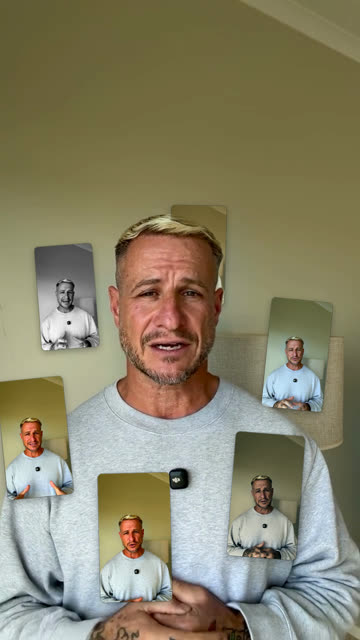
Reels and b-roll
Your reels circle your head: in front at the bottom, behind at the top.
Effect · Reels and b-roll
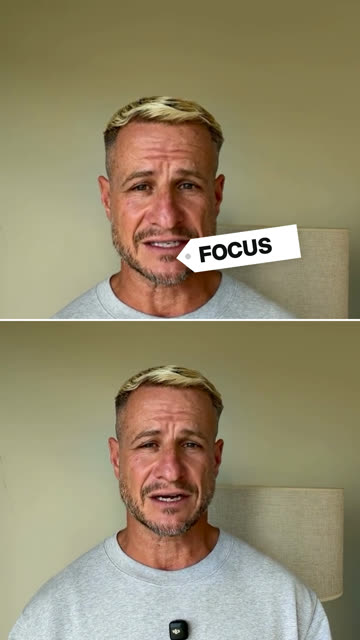
B-roll split is one of SkilledCut's 50+ video effects: split screen: b-roll on top with a price-tag sticker, you below. To add it, give your AI agent your video and one sentence, such as "Add the B-roll split effect on my strongest line". SkilledCut renders it on your computer, nothing is uploaded, and it is included in the one-time plan.
Copy this, paste it into your AI agent with your video:
Add the B-roll split effect on my strongest lineSplit screen: b-roll on top with a price-tag sticker, you below.
Like every SkilledCut effect, it is placed to keep your face clear, and it looks best on screen for 1.5 to 4 seconds.
Say what you want in plain words; your AI agent passes it to SkilledCut. Anything you leave out uses the default.
Show the thing while you talk about it: b-roll on top, you below, with a sticker. Good for products, places and results.
Your reels circle your head: in front at the bottom, behind at the top.
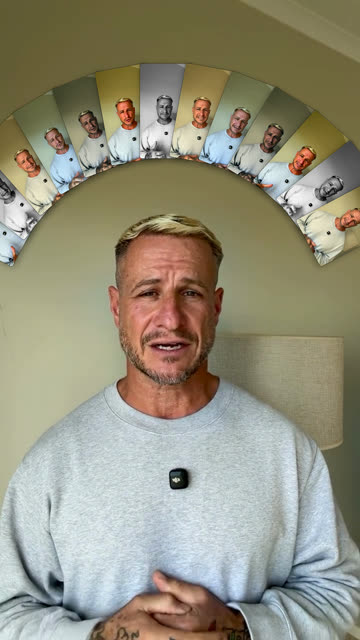
Your covers deal into a fan behind your head, one card at a time.
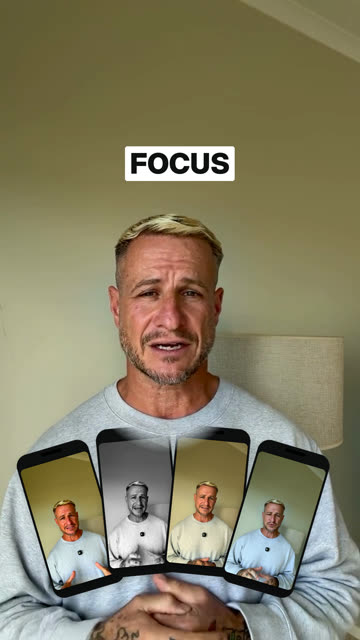
Your reels fan out like a hand of phones in front of you.
Add B-roll split on top of a finished look from the Templates, or browse all 50+ effects.
Give your AI agent your video and say "Add the B-roll split effect on my strongest line". Change the words or the time to suit your clip; a window of 1.5 to 4 seconds looks best. In Claude Code you can also type /effects and name B-roll split. SkilledCut then renders it on your computer.
The sticker text; The b-roll: a folder of pictures or clips inside ~/SkilledCut. Without one, frames from your own video are used.. Anything you leave out uses the effect's default.
More answers in the Guide →
One payment for every template, effect, voice and workflow, plus all upcoming templates. Pay once, use forever.