

4 min readUpdated
AI video editor for Linux: local reels from the terminal or your agent
Short answer
Linux users rarely get modern AI video tools, because most are Mac apps or browser services. SkilledCut runs on 64-bit Linux, installs with one Terminal line, and renders captions, templates and effects locally. Drive it from an MCP agent such as Claude Code, Gemini CLI or Zed, or from plain shell commands.
On this page
Why is AI video editing on Linux usually hard?
The Linux desktop has excellent open-source editors, Kdenlive and Shotcut among them, and ffmpeg can do almost anything if you know the flags. What it lacks is the newer layer: automatic transcription, word-by-word captions, a hook chosen for you, motion graphics placed on the right word. Commercial AI editors mostly ship for macOS and Windows or run in a browser that wants your footage uploaded.
Many Linux users end up writing their own scripts: a speech model for subtitles, a silence detector, an ffmpeg filter graph for burned-in captions. It works, but every new style means another evening of glue code. A local AI editor replaces the glue with finished templates while keeping the shell-friendly habits Linux people like.
What do you need to run SkilledCut on Linux?
Paste the setup prompt into your AI agent and it follows skilledcut.com/setup.md: it installs, checks and connects itself. If you prefer the terminal, the installer line does the same and offers to connect any agents it finds; restart them afterwards. The getting started guide shows both routes.
- A 64-bit Linux distribution on a normal desktop or laptop.
- 8 GB of memory and 2 GB or less of disk space, plus room for clips and renders.
- A terminal. The install line from your purchase email goes straight into it.
- Optionally, an MCP-capable agent: Claude Code, Gemini CLI, Codex, Cursor, VS Code with Copilot, Windsurf, Zed or LM Studio.
How do you edit from the shell with no agent?
Quick mode is where Linux users tend to live. Each template and workflow has a shortcut, and the output always lands in your Downloads folder with a quality report next to it.
A few lines you can type today:
| Command | What you get |
|---|---|
| skilledcut notebook talk.mp4 | An editorial explainer: you in a gliding photo card, words typing on |
| skilledcut big-word intro.mp4 | One big keyword behind your head on every beat |
| skilledcut captions talk.mp4 | Captions only, in the default pop style |
| skilledcut cutpauses talk.mp4 | Pauses and dead air removed, nothing else |
| skilledcut effects checklist talk.mp4 | The checklist effect placed on your strongest list |
| skilledcut ui | A simple local app if you want buttons instead |
Can you script a batch on Linux?
Yes, and this is where Linux beats a click-driven app. Because each edit is one command, a plain loop processes a folder of raw talking heads one after another. For example, a loop over every MP4 in a footage folder that runs `skilledcut wine` on each file gives you a week of studio-look reels while you make dinner.
Two cautions. Run renders one at a time, since SkilledCut works on a single job and the machine needs its full power for each. And read the quality report for every file before you post: it flags a face that drifts out of frame, audio that is too loud or quiet, and black or frozen frames. Scripts are fast; posting a broken clip is not.
Want the same thing with judgement on top? Ask your agent: "Run /wine on every clip in ~/footage/week49 and show me the stills before rendering the rest".
Which templates suit Linux creators?
Every talking-head template renders on Linux. Notebook suits podcast and interview clips, with marker highlights and hand-drawn circles on key words. Big Word is the fastest way to make a keyword reel in your own room. Wine moves you into a wine-red studio with a glass phone card behind your head and your words popping in as you say them.
Float Ad and Lookbook, the photo-to-video templates, are Mac only for now. All effects in the effects library, such as spotlight and backdrop word, work on Linux, and so do the rough cut workflow and its timeline export for finishing in Kdenlive or another editor.
How does an AI agent fit a Linux workflow?
If you already use Claude Code or Gemini CLI in a terminal, the edit becomes one more slash command: `/notebook` on a clip, or a sentence such as "cut the pauses in my latest video and add karaoke captions". The agent reads the transcript SkilledCut drafts, picks the hook and the strongest words, then reviews still frames after the render and fixes what it sees, up to two rounds.
Editors such as Zed or VS Code with Copilot work the same way through MCP. Copy-ready lines for each template and workflow sit in the prompt library.
Templates for this
Ask your AI agent for any of them by name. Every template is included with SkilledCut, plus all upcoming ones.
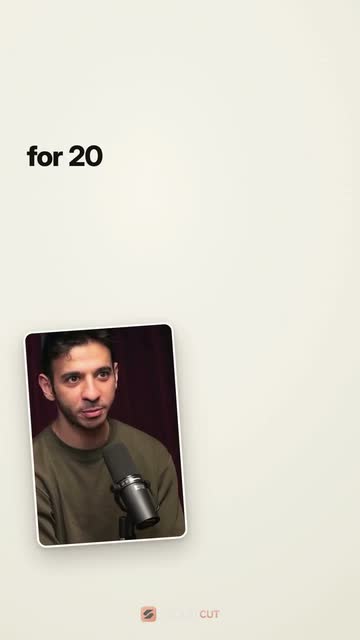 NotebookAn editorial page: you play in a photo card that glides around the page while your words type on in big black type./notebookSee it
 Big WordOne big keyword lands behind your head on every beat, in your own room, with tag chips flying in./big-wordSee it
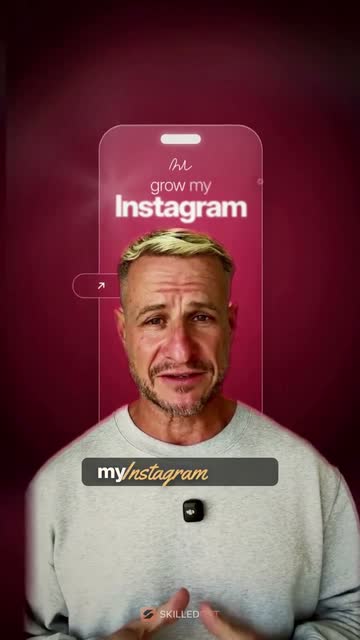 WinePuts you in a wine-red studio with a glass phone card behind your head and your words popping in as you say them./wineSee it
Frequently asked questions
Short answers to what people ask before they try it.
Which Linux distributions does SkilledCut support?
It runs on 64-bit Linux desktops and laptops. Install it with the one Terminal line from your purchase email or let your AI agent run the setup.
Do I need a desktop environment, or can I use only the terminal?
Only the terminal is needed. Quick-mode shortcuts such as skilledcut wine clip.mp4 run from any shell. skilledcut ui opens a simple local app if you want one.
Does SkilledCut replace Kdenlive or Shotcut?
Not for long multi-camera projects. It handles repeatable talking-head reels, captions and effects. The rough cut workflow hands a timeline to your usual editor for anything bigger.
Are my clips uploaded when I edit on Linux?
No. Transcription and rendering run on your machine. An AI agent, if you use one, reads transcript text and a few stills under its own account.
Can one licence cover a Linux workstation and a laptop?
Yes. Each licence works on two computers in any mix of Linux, Windows and Mac.
Keep reading
Software and AI tools
ffmpeg basics for video creators
A beginner's tour of ffmpeg: trim, convert, resize, extract audio and burn subtitles, and how Claude Code can write the commands for you.
ReadSoftware and AI tools
How to automate repetitive video editing tasks
Find repeated steps in your editing, rank them by time, then automate the biggest with templates, scripts or templates. What to keep manual.
ReadBlog
AI video editor for Windows: install, connect and make your first reel
Run an AI video editor on a Windows PC: install with one PowerShell line, connect your AI agent, pick a template and render reels locally with no upload.
ReadBlog
Offline AI video editor: what really works without internet
Can an AI video editor work offline? What really runs on your computer, what still needs a connection, and how to edit reels on a plane or a weak signal.
ReadComparisons
SkilledCut vs editing video with ffmpeg
ffmpeg is a free command-line tool that can cut, scale and burn captions into video. Learn what it does well and where a template saves you time.
Read
More in the blog or all 16 templates.
Your next Reel is one prompt away.
One payment for every template, effect, voice and workflow, plus all upcoming templates. Pay once, use forever.