

Roundups2 min readUpdated
Best AI tools for turning podcasts into clips
Short answer
AI podcast clip tools find strong moments, reframe to vertical and add captions. Compare how much control you get over moment choice, how well the reframe follows speakers, caption quality and where your video is processed. Opus Clip, Vizard, Riverside and SkilledCut's Shorts workflow take different approaches.
On this page
What should a clip tool do well?
- Suggest moments that stand alone
- Let you confirm or change the start and end
- Follow the speaker when reframing to 9:16
- Add accurate captions and a hook title
- Keep the original audio quality
- Be clear about privacy and pricing
How do the options differ?
| Tool | Approach |
|---|---|
| Opus Clip | Online service that finds clips from long video |
| Vizard | Online clipping with an editor |
| Riverside | Recording studio with clip tools |
| SkilledCut | Shorts workflow on your computer, you confirm moments |
Descriptions as of November 2026. Check vendors for current features and pricing.
How do you test?
Use the same 30-minute episode in each tool and compare the first three clips: do they start and end cleanly, do captions fit and does the speaker stay in frame? SkilledCut's Shorts workflow suggests moments of 15 to 45 seconds that you pick from, and the Bold template adds a hook look to the best clip. See podcast clip promotion.
If you already work in Claude, Codex or Cursor, the Claude clipping skill page shows how an AI agent picks and adjusts the moments before anything renders.
How do you style a podcast clip once you have picked it?
Finding the moment is half the job. The other half is making a landscape, two-person recording look intentional in 9:16. Three SkilledCut templates are built for talking clips like this. Notebook plays the speaker in a small photo card on a paper page while the words type on, which suits an interview answer. Throwback cuts the speaker out over retro poster backdrops that change every line, which suits a strong opinion. Bold drops a giant word behind the speaker on each key idea.
Run the Shorts workflow first to get the vertical clip that follows the speaker's face, then ask your AI agent for the template by name. Throwback cuts one speaker out of the frame, so pick a moment where only one person is on screen.
Make it with your AI agent
Type "/notebook on my podcast clip" in Claude Code, Codex or Cursor with the clip attached: best ai clip tools for podcasts, handled on your computer. Copy more in the prompt library or see the Notebook template.
Templates for this
Ask your AI agent for any of them by name. Every template is included with SkilledCut, plus all upcoming ones.
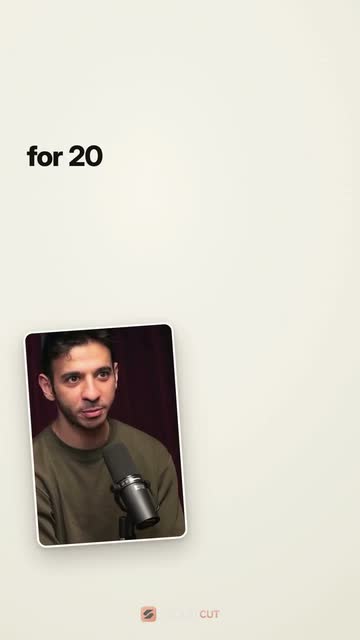 NotebookAn editorial page: you play in a photo card that glides around the page while your words type on in big black type./notebookSee it
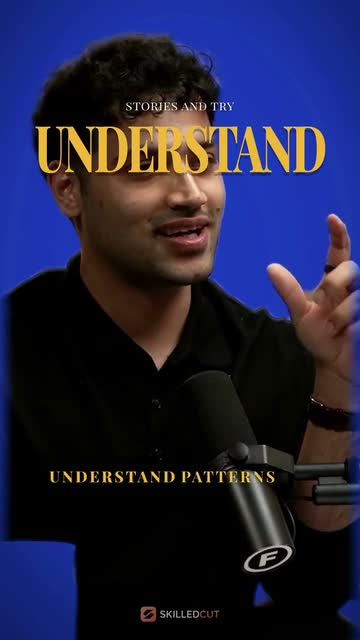 ThrowbackYou cut out over bold retro posters that change on every line, with tall vintage headlines from your own words./throwbackSee it
 BoldA 10-second reel where giant words slam in behind you and captions pop word by word./boldSee it
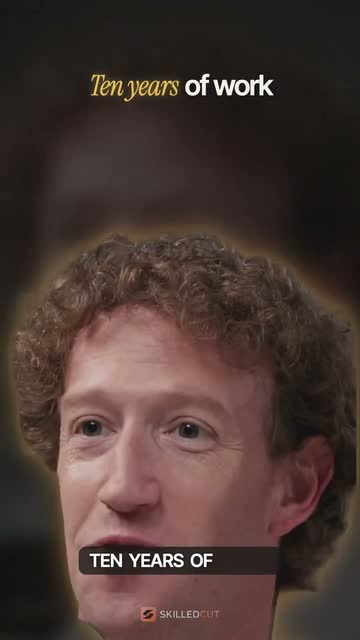 ExplainerTurns a talking clip into a clear lesson with gold word-by-word captions and points on screen./explainerSee it
Frequently asked questions
Short answers to what people ask before they try it.
Can AI choose the best moments?
It can suggest candidates, but you should review them.
Is vertical reframing reliable?
It works best with one clear speaker and good framing.
Do these tools work for audio-only podcasts?
Some require video. Check each tool.
How many clips should I post?
Quality first. A few strong clips beat many weak ones.
Keep reading
Blog
Best caption tools for short videos
What to look for in a caption tool: accuracy, styles, safe placement, editing and export, plus the main types of tool and their trade-offs.
ReadWorkflows
Workflow: podcast episode to weekly clips
Turn one video podcast episode into a week of styled clips: choose moments, trim, caption, style and schedule. Where tools can help find moments.
ReadShort-form growth
Repurpose one video into many short clips
A repurposing workflow: choose moments, trim, caption and reformat for each platform. Includes a checklist and the limits of automated clipping.
ReadBlog
Opus Clip vs Submagic
Opus Clip finds clips in long videos; Submagic leads on captions. A fair comparison by job, plus a third option that styles a clip you chose.
ReadUse cases
Turn podcast moments into styled vertical reels
Pick a strong moment from a video podcast and style it with SkilledCut. How to choose a clip, which template to use and where Opus Clip helps instead.
Read
More in the blog or all 16 templates.
Your next Reel is one prompt away.
One payment for every template, effect, voice and workflow, plus all upcoming templates. Pay once, use forever.