

Alternatives2 min readUpdated
Camtasia alternatives for tutorials and talking-head video
Short answer
If Camtasia is more than you need, alternatives depend on the job. Loom suits quick screen messages, OBS plus a free editor suits budget screen tutorials, and Descript edits by transcript. For videos of a person talking, SkilledCut automates cuts, captions and visuals. Match the tool to the footage.
On this page
What does Camtasia do?
Camtasia records screens and edits tutorials with callouts, zoom and cursor effects. It is a full editor, so each step is yours. People look for alternatives when they want a lighter tool, a different pricing model or less manual work.
Features and prices change, so check each vendor's current page.
Which categories compete?
- Quick screen messages: Loom
- Free recording: OBS Studio with a free editor
- Transcript-based editing: Descript
- Full desktop editors: DaVinci Resolve, Final Cut Pro, Premiere Pro
- Talking-head automation: SkilledCut on your computer
Where does SkilledCut fit?
It does not record screens, so it is an alternative only for the on-camera part of a tutorial. The Explainer template adds gold word-by-word captions, a title and key-point cards to a clip of you teaching. See SkilledCut vs Camtasia for the comparison and the tutorial editing guide for the workflow.
How do you show steps and numbers without a screen recorder?
Tutorials lean on lists, steps and numbers, and several effects draw exactly those around you while you talk. The task list ticks items off as you say them, the to-do shows a short list of actions, the settings toggles flip like a phone's settings, and the growth graph counts up to a number.
Pair them with Explainer for a lesson, or Notebook when the clip is a conversation. You still need another tool for the screen itself; these cover the on-camera half.
Make it with your AI agent
Type "/explainer on my interview clip" in Claude Code, Codex or Cursor with the clip attached: camtasia alternatives, handled on your computer. Copy more in the prompt library or see the Explainer template.
Templates for this
Ask your AI agent for any of them by name. Every template is included with SkilledCut, plus all upcoming ones.
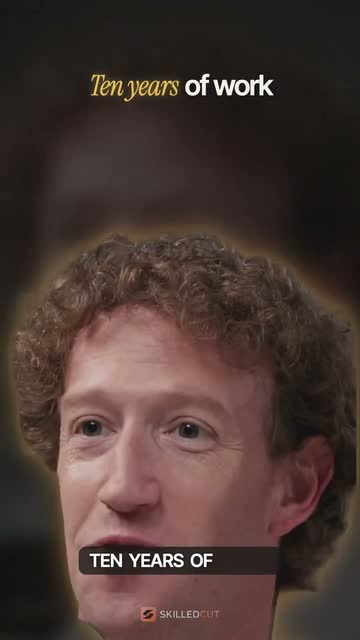 ExplainerTurns a talking clip into a clear lesson with gold word-by-word captions and points on screen./explainerSee it
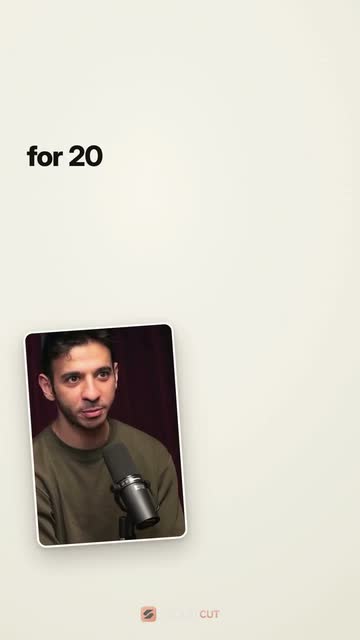 NotebookAn editorial page: you play in a photo card that glides around the page while your words type on in big black type./notebookSee it
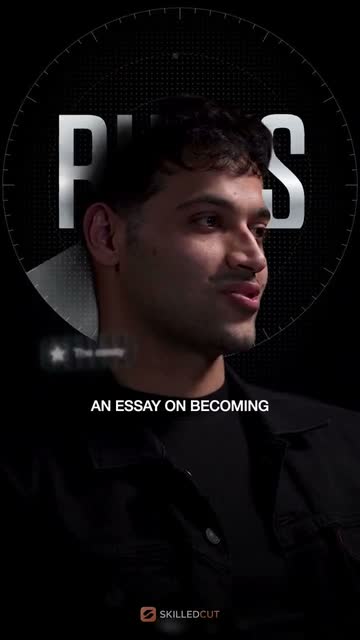 LayersA full motion-graphics edit from one plain clip: words behind your head, plates, charts and cards./layersSee it
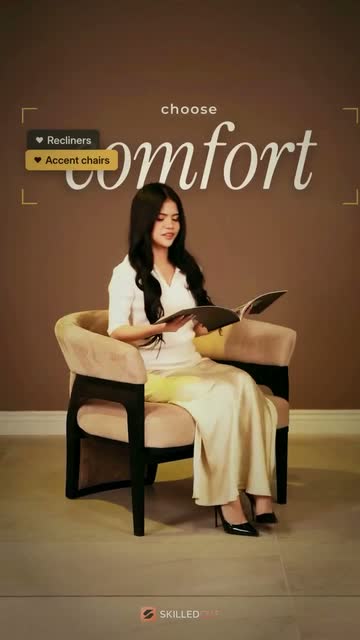 AmberYour key words land big over your head in warm serif type, with gold tag chips flying in, in your own room./amberSee it
Frequently asked questions
Short answers to what people ask before they try it.
Is there a free Camtasia alternative?
Free recorders and editors exist, such as OBS Studio and open-source editors. Check their current terms.
Which tool is best for software demos?
Tools with callouts and cursor effects, such as Camtasia, suit demos best.
Can SkilledCut record my screen?
No. SkilledCut edits video that you have already recorded; it cannot capture a screen.
Which tool is easiest?
A recorder with quick sharing is easiest. A full editor takes more time.
Keep reading
How-to guides
How to light a talking-head video
Simple lighting for talking videos: face a window, add a soft fill, avoid mixed colours and keep your edges clear so cutouts and captions look clean.
ReadHow-to guides
How to edit a talking-head video with AI
Edit a talking-head video with AI in six steps: film clean, cut pauses, caption, add graphics, proofread and export. What AI does and what you decide.
ReadGlossary
What is talking head?
A talking-head video shows a person speaking to camera. Definition, common formats, why it works and how to edit it so it stays interesting.
ReadBlog
Best AI video editors for talking-head videos
Seven ways to edit a talking-head video with AI, from CapCut and Descript to Opus Clip and AI-directed editors, and who each one is best for.
ReadUse cases
Word-by-word captions for talking-head videos
Add captions that follow every word you say. How burned-in word-by-word captions work, caption design tips and which template to pick.
Read
More in the blog or all 16 templates.
Your next Reel is one prompt away.
One payment for every template, effect, voice and workflow, plus all upcoming templates. Pay once, use forever.