

5 min readUpdated
How to edit videos with Claude Code, from first prompt to finished reel
Short answer
To edit videos with Claude Code, install SkilledCut with one setup prompt, open Claude Code in any folder and type a command such as /wine on my latest video. SkilledCut drafts a plan, Claude picks the hook, words and motion graphics, the render happens on your computer, and Claude checks stills before handing back the MP4.
On this page
- 1What does a Claude Code editing session look like?
- 2Step one: set it up with a single prompt
- 3Step two: ask for the edit with a slash command
- 4Step three: read the plan before anything renders
- 5Step four: let the review rounds do their job
- 6Step five: batch the rest of the week
- 7When is Claude Code the right place to edit?
- 8Frequently asked questions
What does a Claude Code editing session look like?
Most guides explain what Claude Code can do in theory. This one follows a single session: a creator with three talking-head clips from the week who wants one Instagram Reel, one TikTok and a set of captions. Everything below happens in one Terminal window, on a Mac, Windows PC or Linux machine, and none of the footage leaves the computer.
The shape of the session is always the same. You ask for a result, SkilledCut prepares the clip and drafts a plan, Claude Code reads the transcript and decides what goes on screen, SkilledCut renders it, and Claude looks at still frames and automatic checks before it tells you the file is ready. Your job is to choose the style and approve the plan, not to drag clips on a timeline.
Step one: set it up with a single prompt
Claude Code can run commands, so it can install SkilledCut for you. Open Claude Code and paste the setup prompt from the prompt library with your licence key in it. Claude reads skilledcut.com/setup.md, shows you the one install command, runs it after you approve, checks the result with a doctor command and connects itself. Then you restart Claude Code once so the new tools load.
If you prefer to type the install line yourself, the getting started guide has it for each system. Either way the install sits in your user folder and needs no admin rights.
- Open Terminal (or PowerShell on Windows) and start Claude Code with the command claude.
- Paste the setup prompt with your licence key and approve the install command when Claude shows it.
- Wait for the doctor check to report that it is ready.
- Quit Claude Code and start it again so the SkilledCut tools and slash commands appear.
Step two: ask for the edit with a slash command
In Claude Code every template and workflow is a slash command. Type a slash and the menu lists them with a short hint. You can name the file, drag it into the Terminal window to paste its path, or say latest, which means the newest video in Downloads, Desktop or Movies.
For the first clip, our creator wants a studio look for Instagram Reels, so the prompt is "/wine on my latest video, end on the word consistency". For the second, a fast hook for TikTok: "/bold on Monday-tips.mp4". For the third, only captions: "/captions karaoke on podcast-cut.mov". Each command also accepts a plain sentence after it, which is where you steer the edit.
| Goal | What to type in Claude Code | What you get |
|---|---|---|
| Studio talking-head reel | /wine on my latest video | Wine look: red studio, glass phone card, closing word |
| 10-second hook reel | /bold on clip.mp4 | Giant words behind the speaker, pop captions |
| Full motion-graphics edit | /layers on my podcast answer | Words behind your head, plates, charts and cards |
| One named effect | /effects checklist on clip.mp4 | A checklist placed on the strongest moment |
| Pauses removed only | /cutpauses on clip.mp4 | A tighter cut with nothing added |
Step three: read the plan before anything renders
This is the part that makes Claude Code different from a one-click app. Before the render, Claude shows a short plan: the time of each beat, the visual it chose and the exact words that will appear. With Layers you might see a hook title in the first two seconds, a big word behind your head at 0:04, a stat card when you say a number and a quote card on your best line.
Read it like an editor would. Is the hook the line you would open with? Is any card covering a moment where your face matters? Is the word on screen one you actually said? SkilledCut only puts your own words, or what is visible in the clip, on screen, so if a word looks wrong it is usually a transcription slip you can correct in one sentence: "the word is Notion, not motion".
Effects that show a name or handle, such as the comment box, ask for yours with the plan. Give it once and Claude reuses it for the rest of the session.
Step four: let the review rounds do their job
After the first render, automatic checks run on the file: is the face visible, is the loudness right for social apps, are there black or frozen frames. Claude also gets a few stills from the finished video. If a caption sits in the platform's safe zone badly or a card lands on your chin, Claude fixes the plan and renders again, up to two review rounds, before it reports back.
When it is done you get the file name in your Downloads folder and a two-line summary of the quality report. If the report flags loudness or a frame-rate issue, Claude offers one enhancement pass and runs it only if you say yes.
Step five: batch the rest of the week
Claude Code keeps the context of the session, so the second and third clips go faster. You can say "same style for the other two clips in Downloads from Tuesday and Thursday" and it will run them one after another, reusing your handle, your preferred closing word style and any spelling fixes you gave earlier.
A few habits keep a batch session clean:
- Name clips by topic before you start, so you can refer to them in plain words.
- Ask for one template per platform: a 10-second Bold cut for TikTok, a longer Layers edit for YouTube Shorts.
- Say "show me the plan for all three first" if you want to approve everything before any render starts.
- Watch each finished 9:16 file on your phone before posting; stills cannot tell you about pacing.
When is Claude Code the right place to edit?
Choose Claude Code if you are happy in a Terminal, want slash commands or edit several videos in a row. If you would rather chat and drag files into a window, the Code tab of Claude Desktop runs the same commands. You can compare every finished style on the templates page and see the one-time ₹999 plan on pricing.
Templates for this
Ask your AI agent for any of them by name. Every template is included with SkilledCut, plus all upcoming ones.
 LayersA full motion-graphics edit from one plain clip: words behind your head, plates, charts and cards./layersSee it
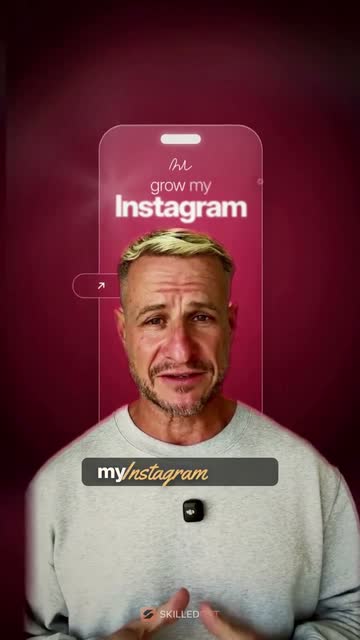 WinePuts you in a wine-red studio with a glass phone card behind your head and your words popping in as you say them./wineSee it
 BoldA 10-second reel where giant words slam in behind you and captions pop word by word./boldSee it
Frequently asked questions
Short answers to what people ask before they try it.
Do I need to know how to code to edit videos with Claude Code?
No. You type sentences and slash commands such as /wine on my latest video. Claude Code runs the commands for you and asks before it installs anything.
Does Claude Code upload my video?
SkilledCut renders on your computer and uploads nothing. Claude sees the transcript and a few small stills so it can direct the edit, under Claude's own terms.
Can I change the edit after the first render?
Yes. Reply in the same session, for example "move the big word to the line about pricing" or "shorter hook", and Claude updates the plan and renders again.
Which templates work best in Claude Code?
All of them work, including Layers, Explainer, Glass and Bold. The same templates also work in Codex, Cursor and other AI agents.
Where does the finished video go?
Into your Downloads folder, named after your clip with the workflow added, together with a short quality report.
Keep reading
How-to guides
How to use Claude Code for video tasks
What Claude Code can and cannot do for video: ffmpeg commands, batch jobs, templates and where a human check is needed. A realistic starter guide.
ReadSoftware and AI tools
How Claude Code skills work
A skill is a folder Claude reads when you name it. How skills are structured, where they are installed and how they differ from prompts or plugins.
ReadComparisons
SkilledCut skills vs prompting Claude Code yourself
You can ask Claude Code to edit video with ffmpeg and no skill. Here is what a ready-made skill adds, and when doing it yourself is the better path.
ReadWorkflows
Workflow: from a talking clip to a finished reel
A seven-step workflow from a raw talking clip to a posted reel: script, film, run the template, review stills, render, check and post.
Read
More in the blog or all 16 templates.
Your next Reel is one prompt away.
One payment for every template, effect, voice and workflow, plus all upcoming templates. Pay once, use forever.