

Alternatives2 min readUpdated
InVideo alternatives for creators who film themselves
Short answer
InVideo generates videos from prompts using stock media, which suits creators without footage. If you film yourself, better alternatives edit your recorded clip: SkilledCut on your computer, CapCut for general edits, Descript for transcript editing or Opus Clip for clips from long videos. Match the tool to your footage.
On this page
What does InVideo do?
InVideo creates videos from text prompts and templates with stock footage and AI-generated scripts. That helps when you do not have footage of your own. It is a different job from editing a clip of yourself.
Check each product's current features and pricing.
What if you film yourself?
- SkilledCut: automates cuts, captions, visuals and voice on your computer
- CapCut: general editor with social templates
- Descript: edit video by editing the transcript
- Opus Clip: finds clips in long videos
- Kapwing: browser editor with subtitles
How do they compare?
For a talking-head video, the key tasks are cutting pauses, captions and a consistent look. The Layers template handles those from a plain clip and renders locally. See SkilledCut vs InVideo for the details.
What if you start from your own photos instead of stock?
Prompt-to-video tools fill the screen with stock or generated shots. If you already have the real thing, such as product photos or outfit photos, Float Ad and Lookbook turn those into video. Float Ad cuts a product out and floats it in a swirl of light, and Lookbook sets each outfit on a white seamless in front of fabric swatches pulled from its colours.
Both use your own images, so the result shows your actual product, and both render on your computer without uploading the photos.
Make it with your AI agent
Type "/float-ad on my product photo" in Claude Code, Codex or Cursor with the clip attached: invideo alternatives, handled on your computer. Copy more in the prompt library or see the Float Ad template.
Templates for this
Ask your AI agent for any of them by name. Every template is included with SkilledCut, plus all upcoming ones.
 Float AdTurns a product photo into a hero ad: the product floats and turns in a swirl of light, no filming needed./float-adSee it
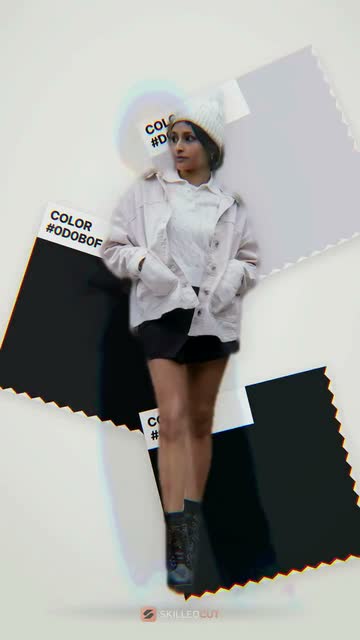 LookbookTurns outfit photos into a fashion lookbook, each look in front of fabric swatches in its own colours./lookbookSee it
 AmberYour key words land big over your head in warm serif type, with gold tag chips flying in, in your own room./amberSee it
 LayersA full motion-graphics edit from one plain clip: words behind your head, plates, charts and cards./layersSee it
Frequently asked questions
Short answers to what people ask before they try it.
Does SkilledCut make videos from a prompt?
No. It edits video you have recorded.
Which is best for faceless channels?
Tools built around stock and voice, with checks on platform rules.
Which is best for personal brands?
Tools that edit your own footage.
Can I combine tools?
Yes. Use one for generation and another for talking-head edits.
Keep reading
Blog
VEED alternatives for video creators
VEED alternatives for creators: Kapwing, Canva, CapCut, Descript, Clipchamp and SkilledCut compared by job, not hype. No prices quoted.
ReadBlog
iMovie alternatives for Mac creators
What to use when iMovie feels limited: pro timelines, free options and tools that automate talking-head edits. Honest notes on each.
ReadBlog
Kapwing alternatives by task
Kapwing alternatives compared by task: VEED, Canva, Clipchamp, CapCut, Descript and SkilledCut. Where each is stronger, with no quoted prices.
ReadBlog
Descript alternatives, by what you edit
Descript alternatives by job: text-based editing, silence removal, manual timelines and styled talking-head edits. Where each one is stronger.
ReadBlog
Submagic alternatives for captions and shorts
Submagic alternatives for captions and short-form edits: VEED, Kapwing, CapCut, Opus Clip, Descript and SkilledCut, matched to what you need.
Read
More in the blog or all 16 templates.
Your next Reel is one prompt away.
One payment for every template, effect, voice and workflow, plus all upcoming templates. Pay once, use forever.