

5 min readUpdated
12 product video ideas for small brands with no film crew
Short answer
The best product video ideas for a small brand are simple to film and easy to repeat: a floating hero shot from a photo, a founder intro, a before and after, a price-tag b-roll split, a comment reply, a top-three list and an outfit lookbook. Film on a phone, then let a template do the editing.
On this page
What makes a product video idea work for a small brand?
A small brand rarely loses on ideas. It loses on repeatability. An idea that needs a studio, a model and a day of editing gets made once. An idea you can film on a phone in ten minutes and edit the same way every week becomes a series, and series are what build recognition on Instagram Reels, TikTok and YouTube Shorts.
So each idea below passes three tests: you can film it with what you already have, it shows the real product rather than a mock-up, and it fits a vertical 9:16 frame with the product or your face in the middle third. Next to each one is the edit style that suits it, so you can go from raw clip to post without learning a timeline editor.
Ideas you can make from photos alone
Some weeks there is no time to film. These two ideas start from photos you already have on your product pages.
- The floating hero shot. One sharp product photo becomes a short ad where the product floats and turns in light streaks with a reflection. Use Float Ad, which takes one to six photos and runs on a Mac with Apple Silicon for now. It is ideal for launches and restocks.
- The outfit lookbook. Three to twelve full-body outfit photos become a lookbook where each look sits on a white seamless in front of fabric swatches in its own colours. Use Lookbook, also Mac only for now. It suits clothing, bags and accessories, and our lookbook guide shows what photos work.
Ideas built around the founder
People buy from people, and a founder on camera is the one asset a large competitor cannot copy.
- The thirty-second origin story. Why you started, in your own room, in your own words. Amber suits it: your key words land big over your head in warm serif type with gold tag chips, and the room is graded warm rather than replaced.
- The 'how it is made' tour. Walk through one step of production while talking. Keep it to one step per video; three steps become three posts.
- The honest no. Explain what your product is not for. It builds trust and filters out returns. A Reject stamp on the word you rule out lands the point.
- The comment reply. Pick a real question from your comments and answer it on camera. The Comment box effect types the comment into an Instagram-style bar before you answer.
Ideas that show the product working
- The before and after. A stain, a messy desk, dull skin, a slow process. Film both states from the same angle. The Swipe effect sweeps a slider across from before to after.
- The b-roll split with a price tag. Product footage on top, you talking below, with a price-tag sticker on the b-roll. That is exactly what B-roll split builds, and it works for a 'three things under one price' format.
- The top-three list. 'Three ways customers use this.' The Line-up or Checklist effect puts numbered tiles or ticking steps on screen as you name each one.
- The tier list. Rank your own range or common alternatives in your category and say why. Tier list drops a tier list in front of you and your pick flies into the top tier.
- The product reel in one look. Hold the product, say its name and two benefits. Cobalt puts a bold blue keyword behind your head on every beat, flies in photo cards taken from your own clip and finishes with a bright, clean grade, which flatters products and fabric.
Which idea should you start with?
Pick two ideas and alternate them for a month. That gives your audience a pattern to recognise and gives you real numbers to compare, instead of guessing from one post.
How to edit these without an editor
SkilledCut is an AI video editor that runs on your own computer, so product footage and unreleased designs never leave it. Drag the clip into your AI agent, such as Claude, Codex or Cursor, and say what you want in one sentence. For example: "/cobalt on this clip, the keywords are the product name and 'refillable'." SkilledCut drafts the plan, the agent picks the hook and the words, the render runs locally, and the finished video lands in your Downloads folder with a short quality report.
Copy-ready prompts for every template are in the prompt library. If you do not use an AI agent, the quick mode works from a command line, for example `skilledcut reel clip.mp4` for a captioned reel. One plan of ₹999 covers every template and effect; details are on the pricing page.
Templates for this
Ask your AI agent for any of them by name. Every template is included with SkilledCut, plus all upcoming ones.
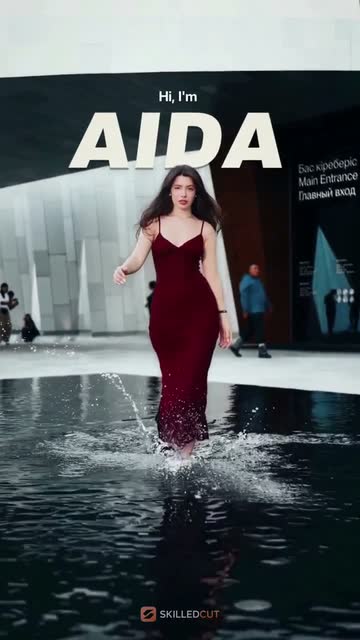 CobaltA bold blue keyword behind your head on every beat, with photo cards from your clip and a bright, clean grade./cobaltSee it
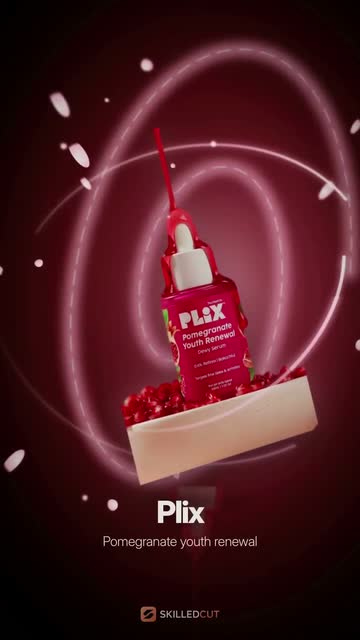 Float AdTurns a product photo into a hero ad: the product floats and turns in a swirl of light, no filming needed./float-adSee it
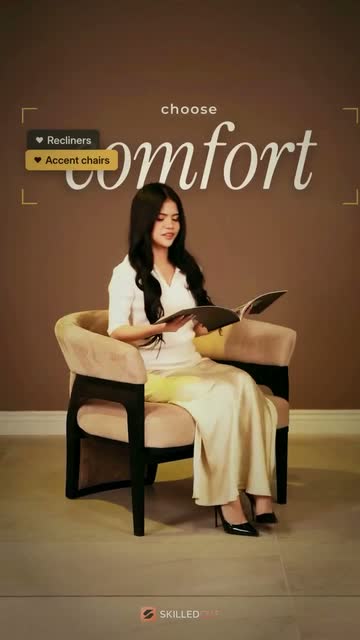 AmberYour key words land big over your head in warm serif type, with gold tag chips flying in, in your own room./amberSee it
Frequently asked questions
Short answers to what people ask before they try it.
How long should a product video be for Reels or TikTok?
Most of these ideas work in 8 to 30 seconds. Put the product or the result on screen in the first second, then add detail.
Can I make a product video without filming?
Yes. Float Ad turns product photos into a floating hero ad and Lookbook turns outfit photos into a lookbook, both on a Mac for now.
Should the founder appear in product videos?
Not in every one, but founder videos are hard for larger brands to copy. Mixing founder clips with product-only clips works well for most small brands.
Do I need professional lighting?
No. Face a window, keep the background tidy and hold the phone steady. Templates with their own grade, like Cobalt and Amber, help phone footage look consistent.
Is my product footage uploaded anywhere?
No. SkilledCut edits on your computer, so unreleased products stay private until you post.
Keep reading
Blog
How to turn a product photo into a video ad with AI
Make a floating product ad from one photo on your computer: how Float Ad works, what photo to use, what to type and what you get in about six seconds.
ReadHow-to guides
How to make a product demo video
A demo video should show the problem, the product solving it and one next step. Structure, length, screen vs face and how to keep it clear.
ReadUGC
UGC for small brands
A small-brand guide to using UGC: ask customers, brief creators, pick formats and test hooks, with low-cost tips and rights checks.
ReadSocial media
Social media video strategy for a small business
A practical video strategy for small businesses: goals, audience, three content types, a weekly rhythm and measurement. Without agency budgets.
ReadUse cases
Video editing for e-commerce founders
E-commerce founders can use a to-camera clip for brand stories, product education and ad hooks. See which template suits each and its limits.
Read
More in the blog or all 16 templates.
Your next Reel is one prompt away.
One payment for every template, effect, voice and workflow, plus all upcoming templates. Pay once, use forever.