

4 min readUpdated
Is it safe to upload videos to AI? Sort your footage by risk first
Short answer
Uploading videos to AI is reasonably safe for public, low-stakes clips on a reputable service, and risky for client footage, children, health details, unreleased products or anything under NDA. Sort each clip by what it would cost you if it leaked, then edit sensitive footage with a tool that renders locally, such as SkilledCut.
On this page
Why is there no single yes or no answer?
Safety depends far more on the footage than on the tool. A reel you were going to post publicly anyway exposes almost nothing when a server processes it, because the whole world sees it an hour later. A recorded client strategy call, a patient testimonial or a product that launches next quarter is different: once a copy sits on someone else's server, you rely on their security, their retention rules and their staff access.
So instead of asking whether AI is safe, ask a narrower question for each clip: what would happen if this exact file, or its transcript, became public or was kept for years? The answer sorts your footage into tiers, and each tier gets a different editing route.
How do you sort your footage by risk?
Faces and voices count as personal data in many places, so the tier depends on who is in the shot, not only on the topic.
| Tier | Examples | Suggested route |
|---|---|---|
| Public | Reels, Shorts, TikToks you will post as is | Any reputable tool; cloud is fine |
| Private but harmless | Outtakes, drafts, B-roll of your desk | Prefer local; cloud acceptable |
| Confidential | Client calls, internal training, unreleased products | Local editing only; check what the AI agent sees |
| Protected people | Children, patients, students, staff who did not agree to AI processing | Local only, and get consent first |
| Contractual | Anything under NDA or a brand brief with data terms | Follow the contract; usually no third-party upload |
What does an upload actually expose?
People picture one file going to one company. In practice, an upload to a cloud AI editor can create several copies of several kinds of data:
- The video file itself, stored while it processes and often afterwards so you can re-edit.
- The audio track and transcript, which contain every name, number and opinion said aloud, in searchable text.
- Frames from the video, which can show screens, documents, whiteboards and house numbers in the background.
- Metadata, such as location tags from a phone recording and the original file name.
- The finished render, sometimes hosted on a share link that anyone with the URL can open.
Before uploading anything confidential, scrub the frame: close other tabs, turn papers face down and check reflections in glasses and windows.
How does local editing change the picture?
A local editor removes the first and biggest copy: the video never leaves your computer. SkilledCut transcribes, cuts, captions and renders on your own Mac, Windows PC or Linux machine, and the finished MP4 goes to your Downloads folder. SkilledCut never receives the file, the audio or the transcript.
One layer is worth understanding. If you use an AI agent such as Claude, Codex or Cursor to direct the edit, that agent reads the transcript text SkilledCut drafts and may look at a few still frames to check that text is not over your face. That goes to the agent's provider under your own account and its data settings. For confidential or protected footage you can skip the agent entirely: quick mode (`skilledcut notebook call.mp4`, or the local app via `skilledcut ui`) plans and renders with no AI service involved.
What is a safe routine for sensitive clips?
- Decide the tier before you open any editor, and write it in the file name, for example client-acme-CONF-2026-12.mp4.
- Keep confidential footage out of cloud-synced folders while you work on it.
- For confidential or protected tiers, edit in quick mode with no agent: `skilledcut captions call.mp4` for captions, or a template such as `skilledcut wine call.mp4`.
- For lower tiers, use your agent normally, for example "/notebook on my latest video, keep names out of the on-screen text".
- Watch the full render before sharing. On-screen text only uses the speaker's words, so make sure nobody said a client name you need to cut.
- Delete raw files you no longer need, and share finished videos as files, not public links.
Which templates work well for confidential material?
Internal training and client explainers often need clarity more than flash. Explainer turns a talking clip into a lesson with gold word-by-word captions and key points on screen. Notebook makes an editorial page from an interview, useful for case studies. Wine gives a polished studio look to a plain recording made in a meeting room.
All three run on your computer like every SkilledCut template. Ready prompts are in the prompt library, and the guide does AI video editing upload your videos goes deeper on exactly what SkilledCut contacts.
Templates for this
Ask your AI agent for any of them by name. Every template is included with SkilledCut, plus all upcoming ones.
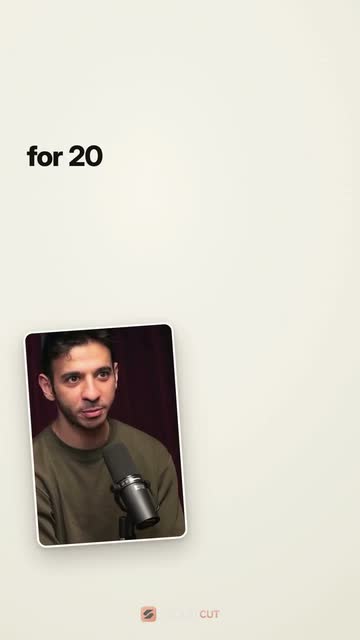 NotebookAn editorial page: you play in a photo card that glides around the page while your words type on in big black type./notebookSee it
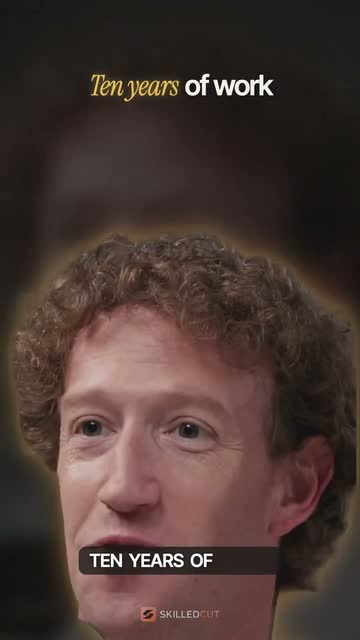 ExplainerTurns a talking clip into a clear lesson with gold word-by-word captions and points on screen./explainerSee it
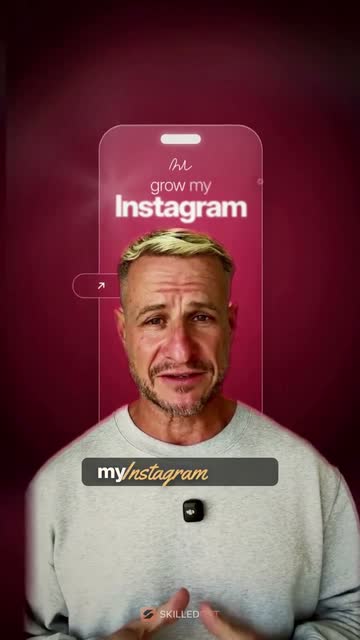 WinePuts you in a wine-red studio with a glass phone card behind your head and your words popping in as you say them./wineSee it
Frequently asked questions
Short answers to what people ask before they try it.
Is it safe to upload my Instagram Reels to an AI editor?
For clips you plan to post publicly anyway, the extra risk is small on a reputable service. Check the terms for training use and how long files are kept.
Do AI video tools use my uploads to train their models?
Some do, some do not, and settings change. Read the privacy policy and data settings of each service. A local editor avoids the question because the file never leaves your computer.
Is a transcript as sensitive as the video?
Often yes. It contains every name, number and opinion spoken, in searchable text. Treat it with the same care as the video.
Can I edit client footage under an NDA with AI?
Follow the contract. Many NDAs rule out third-party uploads. A local tool used in quick mode, with no cloud AI agent, keeps the footage and transcript on your computer.
Does SkilledCut see my videos?
No. Editing and rendering run on your computer, and SkilledCut never receives your video, audio or transcript.
Keep reading
How-to guides
Does AI video editing upload your videos?
What leaves your computer when you edit with AI and SkilledCut: video files stay local, while your AI agent reads the text and stills it needs to plan.
ReadFor creators
How creators can use AI tools safely
Use AI in your workflow without losing trust: what to check, disclosure norms, privacy of footage, copyright cautions and keeping your voice.
ReadBlog
Offline AI video editor: what really works without internet
Can an AI video editor work offline? What really runs on your computer, what still needs a connection, and how to edit reels on a plane or a weak signal.
ReadFor creators
Copyright basics for video creators
General copyright basics for creators: music, clips, images, fair use myths, licences and keeping records. Not legal advice; rules vary by country.
ReadBlog
AI video editing for agencies: a pipeline for many clients
Set up AI video editing for agencies: one template per client, an intake folder, saved prompts, review rounds and delivery that scales without new hires.
Read
More in the blog or all 16 templates.
Your next Reel is one prompt away.
One payment for every template, effect, voice and workflow, plus all upcoming templates. Pay once, use forever.