

4 min readUpdated
Instagram Reels for coaches: five formats you can film in one session
Short answer
Instagram Reels for coaches work best as a small set of repeatable formats: the client question, the myth fix, the three-step method, the session story and the offer reminder. Film several of each in one sitting, give each format its own consistent look, and let an AI video editor do the cutting and captions.
On this page
Why formats beat one-off ideas
Most coaches stall on Reels for the same reason: every video starts from a blank page. A format removes that. Once you know the shape of a 'client question' Reel, you only need the question. Your audience also learns what to expect, which makes a series easy to recognise in the feed.
The five formats below cover the jobs a coaching account needs: show you understand the problem, correct bad advice, teach something useful, prove it works with a real story, and remind people how to work with you. Film all five in one session and you have a few weeks of Reels.
Format 1: the client question
Outline: read a question you get often, give the short answer, add one reason, close with a next step. Example: "A client asked me last week, should I set goals for the year or the quarter? Quarter. A year is too far away to plan your week around. If you want my quarterly sheet, comment PLAN."
Suggested look: the comment box effect on the question, so it appears as a real comment card, then plain captions. This format ties neatly into a comment keyword CTA.
Format 2: the myth fix
Outline: state the common advice, say why it fails for your clients, give the better version. Keep it respectful; correct the idea, not a person.
Suggested look: Glass, a premium 10-second reel with a glass ribbon behind you and frosted cards behind your head on key words. Ten seconds forces you to state the myth and the fix in two clean lines, which is what makes this format shareable.
Format 3: the three-step method
Outline: promise the result, give three short steps, recap in one line. This is the format people save, so make each step a phrase they could write down.
Suggested look: Explainer. It turns a talking clip into a lesson with gold word-by-word captions, a title above your head and key points appearing as you explain. A checklist or numbered chapters make the progress visible, so viewers know how far through they are.
Format 4: the session story and format 5: the offer reminder
The session story is a short case study told with permission: where the client started, the one change you made together, what happened. Do not invent or exaggerate outcomes, and anonymise details unless the client agrees to be named. Stories build trust that tips cannot.
The offer reminder says plainly what you offer, who it is for and how to start, in under 30 seconds. One a week is plenty.
Suggested look for both: Amber, built for founder and brand intros. Your key words land big over your head in warm serif type with gold tag chips, in your own room, which feels personal rather than salesy.
A one-session recording plan
- Write the 14 topics on cards before you start, one per take.
- Film all takes of one format in a row, so your energy matches.
- Change your top between formats if you want them to look like different days.
- Name each file with its format and topic, then edit them in a batch.
| Format | Takes to record | Length | Template or effect | Prompt |
|---|---|---|---|---|
| Client question | 4 | 20 to 40 s | Comment box + captions | "/effects comment-box on my question at the start" |
| Myth fix | 3 | 10 s | Glass | "/glass on this clip" |
| Three-step method | 3 | 45 to 75 s | Explainer | "/explainer on my method clip" |
| Session story | 2 | 45 to 90 s | Amber | "/amber on my client story" |
| Offer reminder | 2 | 15 to 30 s | Amber or captions | "Add pop captions to my offer clip" |
Editing the batch without losing a day
SkilledCut runs on your own computer and your AI agent directs each edit: it picks your strongest words and the hook, chooses motion graphics, renders, then reviews stills and fixes what it sees. You get each finished Reel in your Downloads folder with a short quality report. Nothing is uploaded, which matters if a client story mentions anything private.
Explainer, Glass, Amber and the effects work from any connected AI agent. With no agent, use a terminal: skilledcut amber story.mp4. The prompts page lists copy-ready prompts for every template, and pricing covers the one-time ₹999 plan.
Templates for this
Ask your AI agent for any of them by name. Every template is included with SkilledCut, plus all upcoming ones.
 ExplainerTurns a talking clip into a clear lesson with gold word-by-word captions and points on screen./explainerSee it
 AmberYour key words land big over your head in warm serif type, with gold tag chips flying in, in your own room./amberSee it
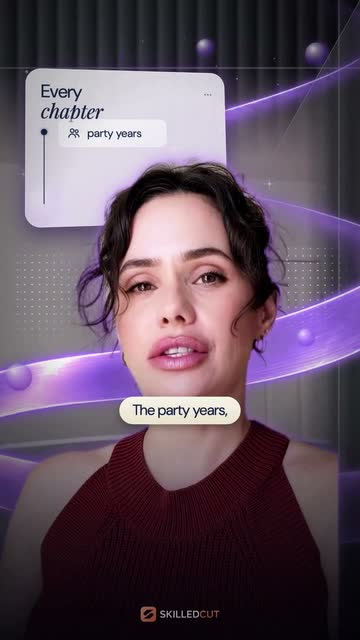 GlassA premium 10-second reel: a glass ribbon behind you, frosted cards and glass scenes cut in./glassSee it
Frequently asked questions
Short answers to what people ask before they try it.
How often should a coach post Reels?
A pace you can keep for months beats a burst. Two or three a week from one monthly recording session is a realistic start for most solo coaches.
Should coaches show their face in every Reel?
Mostly, yes. Coaching is a trust purchase, and your face and voice are what people are deciding about. Text-only posts can fill gaps.
Can I share client results in Reels?
Only with the client's permission and only what really happened. Avoid promising that viewers will get the same outcome.
Which template suits a life coach versus a business coach?
Both can use all five formats. Life coaches often prefer the warm Amber look; business coaches often lean on Explainer for method videos. Pick one look per format and keep it.
What if I do not have time to film every week?
Film once a month. Fourteen takes in one sitting, edited in a batch, covers several weeks at two or three Reels a week, and you can reuse the formats every month with new topics.
Keep reading
Social media
Instagram Reels strategy for coaches and consultants
A Reels plan for coaches: topics, hooks, caption style, posting rhythm and how to move viewers to a conversation. With honest expectations.
ReadUse cases
Video editing for coaches and consultants
How coaches and consultants can turn one talking clip into a polished reel or lesson without a full editing team. What to film and which template to use.
ReadShort-form growth
How to batch record short videos in one session
Film a week of short videos in one sitting: prepare scripts, set up once, change shirt and background, record in order and label files.
ReadBlog
Comment keyword CTAs on Reels: pick the word, show it, deliver
How the 'comment a keyword' call to action works on Reels: picking the word, saying and showing it, delivering the DM, and keeping it honest and useful.
ReadBlog
Reel hook ideas for the first 3 seconds, sorted by goal
Thirty fill-in-the-blank reel hook ideas sorted by goal, plus the visual hook that matches each one: word slams, counters, hook titles and checklists.
Read
More in the blog or all 16 templates.
Your next Reel is one prompt away.
One payment for every template, effect, voice and workflow, plus all upcoming templates. Pay once, use forever.