

4 min readUpdated
Lower thirds and name titles: where your name goes in a vertical video
Short answer
Lower thirds and name titles tell viewers who is speaking and why to listen. In 9:16 Reels, TikTok and Shorts the classic bottom bar collides with captions and buttons, so place the name higher: across the chest, beside the head or on a profile card. Keep it to a name and one credential, shown once.
On this page
Why the classic lower third breaks in vertical video
On television and YouTube widescreen, the lower third is a bar in the bottom part of the frame with a name and a title. It sits there because nothing else does. In a 9:16 Instagram Reel, TikTok or YouTube Short, the bottom of the frame is the busiest place on the screen: the platform puts the account name, the post caption, the audio label and often the progress bar there, and your own captions usually sit just above.
Put a traditional name bar in that zone and one of two things happens: it is covered by the interface, or it fights your captions for the same space. The caption safe zone guide maps the areas each platform covers. The result is that the idea of a lower third survives, but its position has to move.
Where to put a name title instead
| Position | How it looks | Works for |
|---|---|---|
| Across the chest | A strip or label below the chin | Talking heads framed head and shoulders |
| Beside the head | A small lead line or chips next to the face | Founder intros and brand videos |
| Behind the head | A large name or keyword on the wall | Name reveals and personal brand reels |
| On a profile card | A card with photo, name and handle | Creator intros and collaboration posts |
| Top of the frame | A clean headline above the head | Interviews and podcast clips |
Whichever position you choose, keep the right-hand edge clear, because the like, comment and share column sits there on every major platform.
What to write in a name title
A name title has one job: give the viewer a reason to keep listening. A name alone rarely does that. A name with one specific credential does.
Write the credential as a fact, not a slogan. 'Physiotherapist, 12 years' beats 'Your health partner'. 'Founder of a refill skincare brand' beats 'Entrepreneur and dreamer'. If you have a handle that matters more than your name, use the handle. And keep the whole title short enough to read in under two seconds, which on a phone means about six words or fewer.
- Line one: your name or handle.
- Line two: one credential the viewer cares about.
- Show it once, in the first few seconds, for about two to three seconds.
- Do not repeat it on every clip of a series; regular viewers already know you.
Styles that replace the lower third in SkilledCut
SkilledCut does not draw a broadcast-style bottom bar, because that position clashes with vertical video. Instead, several templates and effects put a name or credential where it can be seen. The text comes from your own speech, so say your name and role in the clip, or use an effect that takes a name and handle.
- Amber: a small lead line and one big serif word over your head on each beat, with gold tag chips and corner brackets. Say 'I'm Asha, I run a bakery' and those words can become the lead line and chips.
- Cobalt: a bold blue keyword behind your head, plus a 3D word on the chest, a natural spot for a name reveal.
- Big Word: one big keyword behind your head per beat, with an optional brand end card.
- Tape label: a strip of yellow tape with your line lands on your chest, the closest thing to a modern lower third.
- Pastel word: a soft lavender backdrop with a giant word and a profile card.
- Cover star: you become a magazine cover with the title behind your head, for a bold introduction.
How to ask for a name title
Drag your clip into your AI agent and say where the name should go. For a full intro look: "/amber on my latest video, make my name and 'pastry chef' the first beat." For a single label on any clip: "/effects tape-label on the line where I say my name and job." Effects that show a profile, such as Pastel word, default to a placeholder name and handle, so give your real ones in the same message.
In Claude Code or the Code tab of Claude Desktop those commands run as typed; in Codex, Cursor and other agents, paste the sentence. The prompt library lists ready sentences for each template and effect.
Common name title mistakes
For interviews with a guest, introduce the guest the same way: name and one credential near the top of the frame the first time they speak. Our guide to editing an interview video covers the rest of that format.
- Placing the name in the bottom strip, where it is covered by the platform interface.
- Writing a slogan instead of a credential.
- Leaving it on screen for the whole video, where it competes with captions and graphics.
- Using a font that does not match the rest of the edit.
- Spelling mistakes in names. Check the spelling of every name before rendering, including guests'.
Templates for this
Ask your AI agent for any of them by name. Every template is included with SkilledCut, plus all upcoming ones.
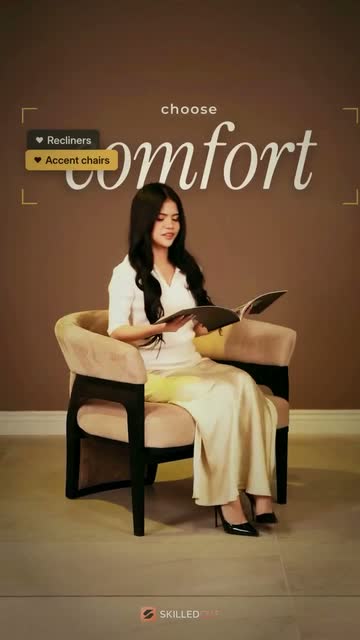 AmberYour key words land big over your head in warm serif type, with gold tag chips flying in, in your own room./amberSee it
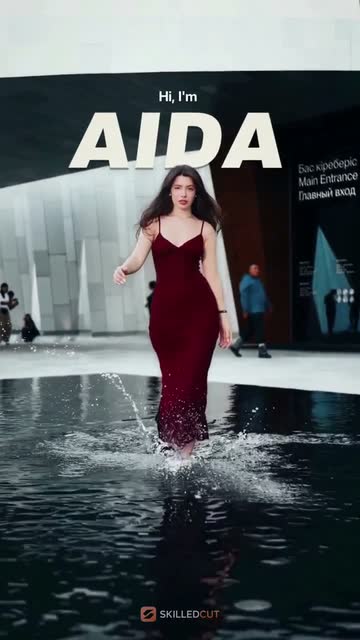 CobaltA bold blue keyword behind your head on every beat, with photo cards from your clip and a bright, clean grade./cobaltSee it
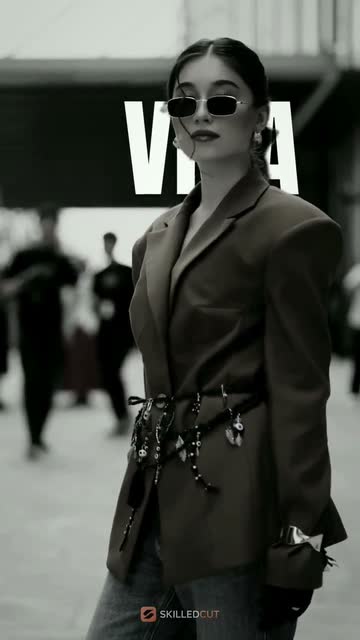 Big WordOne big keyword lands behind your head on every beat, in your own room, with tag chips flying in./big-wordSee it
Frequently asked questions
Short answers to what people ask before they try it.
What is a lower third in video?
A graphic, usually a name and title, that identifies the speaker. It traditionally sits in the bottom part of a widescreen frame.
Should I use a lower third on Instagram Reels?
Use the idea, not the position. Put the name across your chest, beside your head or at the top, so the Reels interface does not cover it.
How long should a name title stay on screen?
About two to three seconds, once, near the start. That is long enough to read a name and a short credential.
Can I add my handle instead of my name?
Yes. If people know you by your handle, use it. Effects with a profile card take both a name and a handle.
Do lower thirds still work for widescreen YouTube?
Yes. In 16:9 video the bottom of the frame is mostly free, so a classic lower third is still a good choice there.
Keep reading
Glossary
What is lower third?
A lower third is a text graphic in the lower part of the screen naming a speaker or topic. Definition, design rules and how it differs from captions.
ReadHow-to guides
Safe zones for captions in vertical video
Keep captions and key text clear of platform buttons and overlays: where interface elements sit, how to test, and how to build a safe margin.
ReadHow-to guides
How to make a profile intro video that converts followers
Introduce who you help and what to expect in under a minute: structure, wording, a pinned placement and a clear next step.
ReadBlog
Kinetic typography for reels: how to make words move with your voice
How kinetic typography works in Reels, TikTok and Shorts: timing words to speech, weight, safe-zone placement and templates that animate type.
ReadBlog
Editorial video style: how to make reels that feel like a magazine
What editorial video style is, who it suits, and how to write a one-page style sheet for type, colour, pace and graphics in your reels.
Read
More in the blog or all 16 templates.
Your next Reel is one prompt away.
One payment for every template, effect, voice and workflow, plus all upcoming templates. Pay once, use forever.