

Start here3 min readUpdated
SkilledCut's {{count}} templates compared: which one for which video
Short answer
SkilledCut has 16 templates. Choose by what you start with: Explainer for lessons, Bold or Glass for 10-second hooks, Wine, Plum, Amber or Studio for a studio or brand look, Notebook or Throwback for podcast clips, Vox for stories and maps, Crayon for playful clips, and Float Ad or Lookbook for photos.
On this page
How are the 16 templates grouped?
The templates fall into four families, and the family tells you more than the name does. Hook reels are short and loud: Glass, Bold, Wine, Plum, Amber, Cobalt and Big Word. Motion edits carry more graphics: Layers, Throwback and Crayon. Teach and explain templates put your words first: Explainer, Notebook, Studio and Vox. Ads and products start from photos: Float Ad and Lookbook.
| Template | You start with | The look in one line |
|---|---|---|
| Layers | A talking clip | Words behind your head, plates, charts and cards |
| Explainer | A lesson clip | Gold word-by-word captions and key points |
| Glass | A talking clip | A glass ribbon, frosted cards, a 10-second reel |
| Bold | A talking clip | Giant words slam in behind you |
| Wine | A talking clip | A wine-red studio with a glass phone card |
| Plum | A talking or full-body clip | A candle-lit plum studio and a rose-gold orb |
| Amber | A clip, with or without speech | A serif keyword over your head, gold tag chips |
| Cobalt | A clip, with or without speech | A bold blue keyword behind you, photo cards |
| Big Word | A clip, with or without speech | One big word per beat, your head in front |
| Notebook | An interview or podcast clip | A paper page, you in a photo card, words typed on |
| Throwback | A talking clip | Retro poster backdrops and tall gold headlines |
| Studio | A talking clip | You on a clean white studio, one huge keyword and an interface card per idea |
| Crayon | A talking clip, still camera | Your room painted into a hand-drawn world with giant bouncy words |
| Vox | A talking clip, or only a script | A paper-collage documentary with maps, charts and newsprint |
| Float Ad | One to six product photos | The product floating in a swirl of light |
| Lookbook | Three to twelve outfit photos | Each outfit on white with fabric swatches |
Which template fits the video you have?
Start from the material, then the feel.
- A lesson or course clip: Explainer, because the key points arrive as you make them.
- A 10-second teaser: Glass for a premium feel, Bold for a punchy one.
- A clip with no speech, only music: Plum, Amber, Cobalt or Big Word, which take your own on-screen lines.
- A podcast or interview answer: Notebook for an editorial page, Throwback for a strong opinion.
- A story with places and numbers, or no footage at all: Vox maps the places and charts the numbers, and can narrate a script by itself.
- A personal intro or product launch: Studio. A playful, family-friendly clip: Crayon.
- A room that looks like a bedroom: Wine or Plum puts you in a designed studio.
- No video at all, only stills: Float Ad for a product, Lookbook for outfits.
What do all 13 have in common?
Every template is finished the same way. Your speech is timed once, the pauses are cut, a music bed sits under your voice, and the loudness is set to a standard social level. The result is a vertical 1080 by 1920 video, apart from Layers, which also makes widescreen. Everything renders on your own computer and nothing is uploaded.
That shared finish is why a series made with one template looks consistent from episode to episode.
Where do you run them: Claude, Codex or Cursor?
Every template runs from Claude Desktop (chat or Code tab), Claude Code and other AI agents, as a /command or a plain sentence. Every template, Layers, Explainer, Glass and Bold included, is directed by your AI agent: it plans the edit, SkilledCut renders it on your computer, and your AI agent reviews the result.
Our guides on editing a talking-head video with AI and on editing video on a MacBook go through the setup.
How can you test a template before you buy?
Each template page shows the same clip before and after, with the prompt that produced it printed under the command, so you can copy the wording and see exactly what you would be asking for. SkilledCut is one payment for every template, and the refund policy covers a purchase that will not run on your computer.
If you are unsure where to start, try the template that matches the video you already post most often.
Make it with your AI agent
Type "/wine on my latest video" in Claude Code, Codex or Cursor with the clip attached: skilledcut templates, handled on your computer. Copy more in the prompt library or see the Wine template.
Templates for this
Ask your AI agent for any of them by name. Every template is included with SkilledCut, plus all upcoming ones.
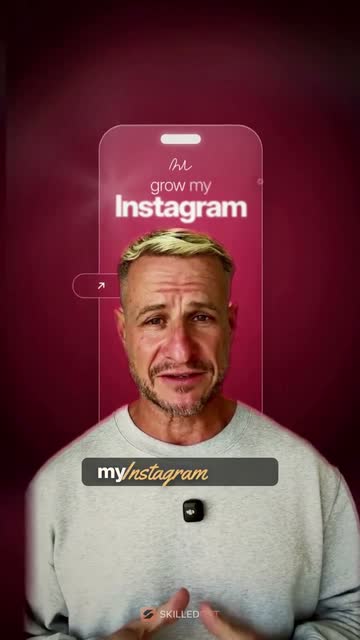 WinePuts you in a wine-red studio with a glass phone card behind your head and your words popping in as you say them./wineSee it
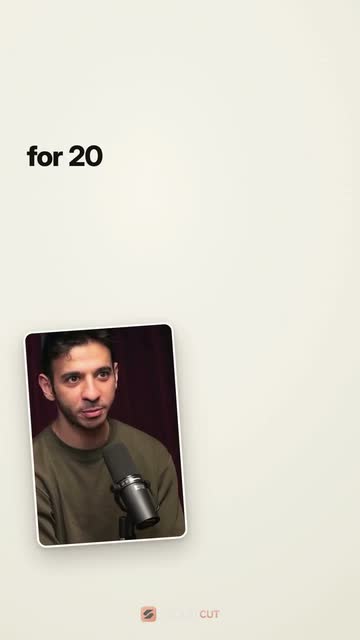 NotebookAn editorial page: you play in a photo card that glides around the page while your words type on in big black type./notebookSee it
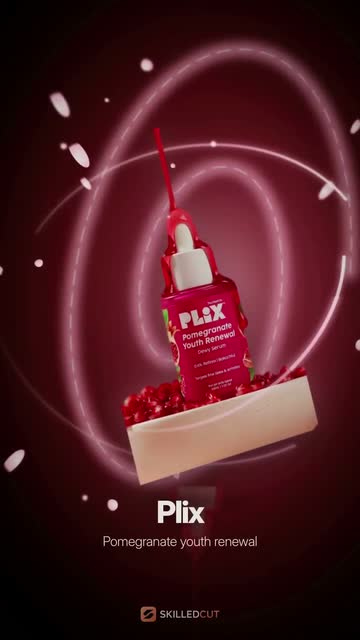 Float AdTurns a product photo into a hero ad: the product floats and turns in a swirl of light, no filming needed./float-adSee it
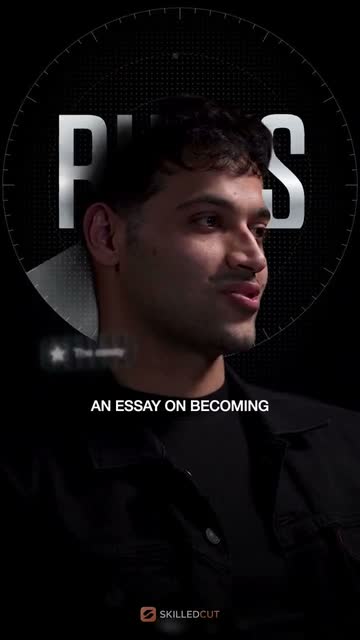 LayersA full motion-graphics edit from one plain clip: words behind your head, plates, charts and cards./layersSee it
Frequently asked questions
Short answers to what people ask before they try it.
Are all {{count}} templates included in the one payment?
Yes. One payment covers every template, effect, voice and workflow, plus the templates that arrive later. There is no per-template price.
Can I use a template on any video?
Video templates work best on one person speaking to camera. Float Ad and Lookbook start from photos instead. Footage with several people, heavy existing edits or screen recordings is a poor fit.
Does a template add a watermark to my video?
No. The demo clips on this site carry a small SkilledCut mark, but the videos you render yourself are your own with no branding added.
How long does a template take to render?
It depends on the clip length and your computer. A short reel takes a few minutes, and a long recording takes longer because the whole clip is transcribed first.
Keep reading
Blog
Best AI video editors for talking-head videos
Seven ways to edit a talking-head video with AI, from CapCut and Descript to Opus Clip and AI-directed editors, and who each one is best for.
ReadHow-to guides
How to keep a consistent brand across videos
Consistency comes from repeated choices: look, voice, structure and sound. A brand checklist, and how one editing template keeps every video matching.
ReadHow-to guides
How to edit a talking-head video with AI
Edit a talking-head video with AI in six steps: film clean, cut pauses, caption, add graphics, proofread and export. What AI does and what you decide.
ReadUse cases
Turn podcast moments into styled vertical reels
Pick a strong moment from a video podcast and style it with SkilledCut. How to choose a clip, which template to use and where Opus Clip helps instead.
ReadHow-to guides
How to edit video on a MacBook
Free and paid ways to edit on a Mac, how Apple Silicon changes speed and what to check before starting a project.
Read
More in the blog or all 16 templates.
Your next Reel is one prompt away.
One payment for every template, effect, voice and workflow, plus all upcoming templates. Pay once, use forever.