

5 min readUpdated
TikTok talking head editing: 9 tips that keep people watching
Short answer
Good TikTok talking head editing starts on a spoken line, not a greeting, cuts every pause, keeps captions clear of the right-hand buttons and the bottom caption area, and changes something on screen every few seconds. End on a line that flows back into the opening so the clip loops cleanly.
On this page
Why does a talking head need different editing on TikTok?
On TikTok your face competes with an endless feed that moves at the flick of a thumb. A talking head has no scenery or action to carry it, so the edit does the work: it decides what the viewer sees in the first second, how fast the ideas arrive and when the picture changes. The same raw clip can feel slow or tight depending only on those choices.
The app also covers part of your frame. Buttons for likes, comments and shares sit on the right, your handle and post caption sit along the bottom, and the search bar can sit at the top. A talking head edit has to work around that furniture, which is why the tips below cover placement as much as pace.
Tips 1 to 3: the opening second
If your best line arrives at second twenty, move it to the front. Many TikTok creators record the payoff first and then explain it, because the first sentence decides whether the rest is heard. Our guide to the first three seconds goes deeper on writing that line.
- Start mid-thought. Cut the hello, the name and the breath before you speak. The first frame should already have your mouth moving on the most interesting line you recorded.
- Put a hook title on screen in the first second. Three to seven words that state the promise of the clip, sitting above your head, give a silent scroller a reason to stop.
- Frame tight. Your eyes should sit roughly a third of the way down the frame. A loose shot with lots of ceiling looks unplanned on a phone screen.
Tips 4 to 6: rhythm in the middle
Jump cuts are fine here; TikTok viewers expect them. What breaks the spell is a cut that lands mid-word or a sudden jump in loudness. If you film in one take, a slight zoom on alternate cuts hides the jump and adds energy.
- Remove every gap longer than a breath. Dead air reads as hesitation on TikTok. Leave a tiny beat between sentences so speech still sounds human.
- Change the picture every three to six seconds. A punch-in, a word behind your head, a checklist or a caption colour change all count. Long unchanged stretches are where viewers drift.
- Cut retakes, not personality. Keep the laugh or the aside that sounds like you, and drop the second and third attempt at the same sentence.
Tips 7 to 9: captions, text and the ending
- Caption every word you say, two to four words at a time, and highlight the key word. Many people watch on mute, and TikTok search reads on-screen text and speech.
- Keep captions and titles in the middle band of the frame. Stay clear of the right-hand button column and the lower part where your handle and post text sit.
- End on a line that leads back to the start. If the final words make sense followed by the first words, a replay feels natural instead of jarring.
| Area of the frame | What TikTok puts there | What to keep out |
|---|---|---|
| Right edge | Like, comment, share and profile buttons | Caption ends, key words, product names |
| Bottom area | Handle, post caption, sound name | Captions, calls to action |
| Top strip | Search and tabs | Hook title edges |
| Middle band | Nothing | This is where captions and titles belong |
Interface layouts change between app versions and regions. Preview a draft on your own phone before posting.
How to do this with an AI video editor
Doing every tip by hand in a timeline takes time per clip. SkilledCut runs on your own computer and lets your AI agent, such as Claude, Codex or Cursor, direct the edit: it reads your transcript, picks the hook line, places visuals on your strongest words and checks the render for a visible face, steady loudness and black frames before handing it back.
For a 10-second TikTok, Bold slams giant blue words in behind your head while captions pop word by word, and the camera never stops moving. For a longer clip filmed in your own room, Big Word lands one keyword behind your head on every beat. If you want a clean studio look instead of your room, Wine puts you in a wine-red seamless set with a glass card behind you.
A prompt you can paste: “/bold on my latest video. Open on the line about doubling prices, keep it under 12 seconds and keep captions in the middle of the frame.” More ready-made prompts live on the prompt library.
A quick check before you post
Posting to Reels and YouTube Shorts too? The same cut usually works on all three, but check each app's overlay positions. Our cross-posting guide lists the differences.
- Watch the first two seconds with the sound off. Do you know what the clip is about?
- Pause on three random frames. Is any text under the buttons or the bottom caption?
- Listen on phone speakers. Is any part much louder or quieter than the rest?
- Watch the last second into the first. Does the loop feel smooth?
- Read every caption once. Names and numbers are where automatic captions slip.
Templates for this
Ask your AI agent for any of them by name. Every template is included with SkilledCut, plus all upcoming ones.
 BoldA 10-second reel where giant words slam in behind you and captions pop word by word./boldSee it
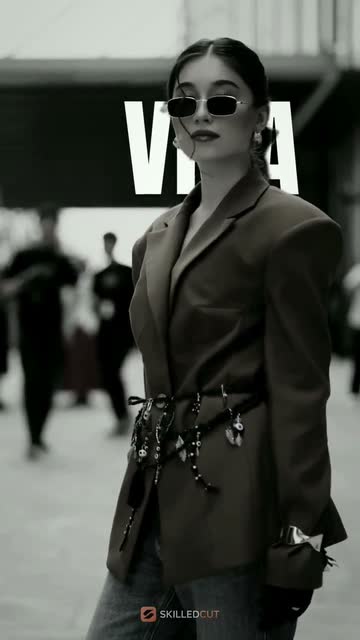 Big WordOne big keyword lands behind your head on every beat, in your own room, with tag chips flying in./big-wordSee it
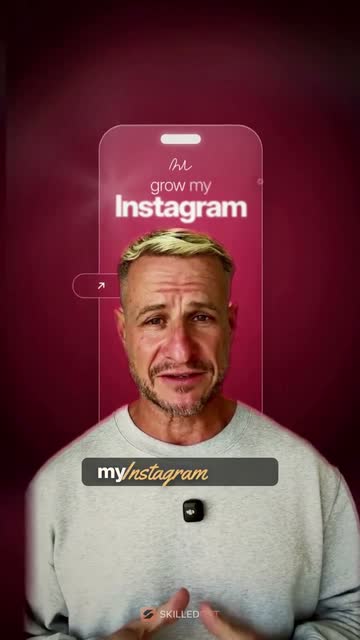 WinePuts you in a wine-red studio with a glass phone card behind your head and your words popping in as you say them./wineSee it
Frequently asked questions
Short answers to what people ask before they try it.
How long should a TikTok talking head video be?
As long as the idea needs and no longer. Many talking heads work best between 15 and 45 seconds, but a tight 60-second explainer beats a padded 20-second one. Cut until every line earns its place.
Should I use jump cuts on TikTok?
Yes. Jump cuts that remove pauses are normal on TikTok. Make them cleaner with a small zoom on every other cut and by never cutting in the middle of a word.
Where should captions go on a TikTok video?
In the middle band of the 9:16 frame, below your chin or above your head. Keep them away from the right-hand button column and the bottom area where your handle and post caption appear.
Can an AI edit my TikTok talking head for me?
Yes. With SkilledCut, your AI agent cuts the pauses, writes captions from your own words, picks the hook and places visuals, then renders on your computer. You review the finished file before posting.
Do I need a ring light and a fancy camera?
No. A phone at eye level facing a window gives clean light. Clear audio from a cheap clip-on microphone matters more than the camera for a talking head.
Keep reading
Platform guides
TikTok video editing guide
How to edit for TikTok: vertical 9:16, hooks, captions, sound and safe zones. Which SkilledCut templates fit and why limits and trends need checking.
ReadShort-form growth
How to write a hook for the first 3 seconds
Write hooks that hold viewers: six hook types with examples, a test method and the mistakes that lose people in the first seconds of a short video.
ReadHow-to guides
Safe zones for captions in vertical video
Keep captions and key text clear of platform buttons and overlays: where interface elements sit, how to test, and how to build a safe margin.
ReadHow-to guides
How to make a talking-head video less boring
Practical ways to keep a to-camera video watchable: tighter cuts, a change every few seconds, strong first lines and visuals that support what you say.
ReadSocial media
TikTok search optimisation: how to get found for a topic
TikTok is also a search engine. How to choose the phrases viewers type, put them in your video and caption and test what ranks.
Read
More in the blog or all 16 templates.
Your next Reel is one prompt away.
One payment for every template, effect, voice and workflow, plus all upcoming templates. Pay once, use forever.