

4 min readUpdated
UGC video editing for brands: from raw creator clips to ad variants
Short answer
UGC video editing for brands means turning a creator's raw clips into several tested versions: different hooks, tight cuts, captions inside the safe zone and a clear call to action. Edit from the original files rather than the creator's own cut, keep the creator's real voice, and make three to five variants per clip to test.
On this page
Why should brands edit UGC themselves?
Creators deliver what the brief asked for, usually one finished cut. That cut is a starting point, not the asset you run for months. Performance teams need the same testimonial with three openings, a 15-second and a 30-second version, captions in a style that matches the brand, and a product moment placed where viewers drop off.
Editing in house from the raw files lets you produce those variants without going back to the creator for each change. It also keeps the look of your ads consistent across ten different creators who all film and edit differently.
Check your agreement first. Re-editing and running paid ads need the right usage rights; UGC usage rights explains the basics.
What should you ask creators to deliver?
Put this list in your brief. How brands brief UGC creators has a full template.
- The raw, unedited takes as well as their cut, in the highest quality they recorded.
- Vertical 9:16 framing with the face in the upper-middle of the frame, away from the bottom where platform buttons sit.
- Three alternative opening lines recorded as separate takes.
- Clean audio: no music under the voice, so you can add your own and caption accurately.
- A few seconds of the product in hand with no talking, for cutaways.
How do you turn one clip into several variants?
Think of a variant as one changed variable. Change too much at once and you cannot tell what worked. The table shows a typical set from a single 45-second testimonial:
| Variant | What changes | Example prompt |
|---|---|---|
| A: problem hook | Opens on the pain point | "Start at 'My skin was always dry' and cut pauses" |
| B: result hook | Opens on the outcome | "Start at 'Two weeks later' instead" |
| C: keyword style | Big keyword behind the creator | "/cobalt on this clip, keywords DRY, HYDRATED, DAILY" |
| D: short cut | 15 seconds, one claim | "Keep only the strongest 15 seconds and end on Shop now" |
| E: captions only | Native look, pop captions | "Add pop captions, nothing else" |
Which edit styles fit UGC ads?
UGC works because it feels native, so keep the creator and their room on screen. Cobalt adds a bold keyword behind the head and photo cards pulled from the clip, built for product and fashion reels. Big Word lands one keyword per beat with tag chips flying in, while the creator stays in front of the word. For the most native look, the captions workflow adds word-by-word captions in pop, karaoke, boxed or minimal style.
To pair a testimonial with a product hero shot, Float Ad turns one to six product photos into a floating product ad on a Mac, which you can cut in after the creator's claim. Only the creator's own words appear on screen, so the variant never puts a claim in their mouth they did not say.
What is the editing routine, step by step?
- Save each creator's raw takes in a folder named brand-creator-product-date.
- Watch once and mark the strongest claim, the best opening line and any words to cut.
- Open your AI agent and run the first variant, for example "/cobalt on creator-maya-serum-raw.mp4, keyword HYDRATED, end on Shop now".
- SkilledCut drafts the plan on your computer, the agent picks the strongest words and checks stills for text over the face, and the 9:16 file lands in Downloads.
- Ask for the other variants as short follow-ups so the look stays identical and only the tested variable changes.
- Name each export by variant letter so your ad results map back to the edit.
How do you protect creator footage and trust?
Creators send raw takes, outtakes and sometimes their home on camera. Editing locally means those files stay on your computers instead of a third-party cloud. SkilledCut never receives the video; an AI agent, if you use one, reads transcript text and a few stills under your account.
Trust also means honest edits. Do not cut a sentence so it says the opposite, do not stitch words into a claim nobody made, and credit the creator where your agreement says so. Ready UGC prompts for each variant type are in the prompt library.
Templates for this
Ask your AI agent for any of them by name. Every template is included with SkilledCut, plus all upcoming ones.
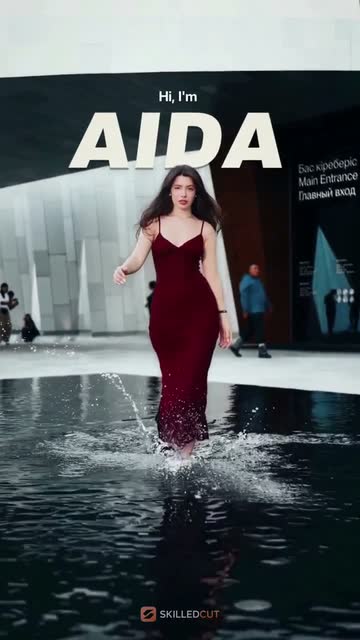 CobaltA bold blue keyword behind your head on every beat, with photo cards from your clip and a bright, clean grade./cobaltSee it
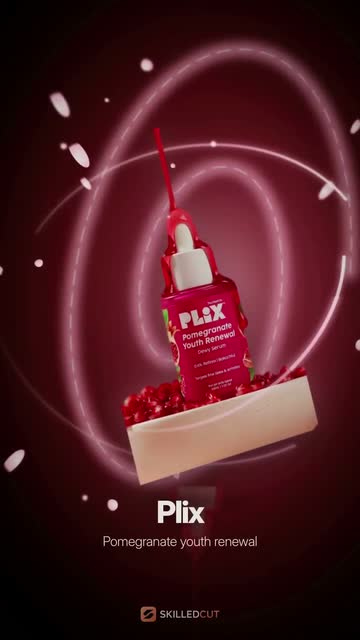 Float AdTurns a product photo into a hero ad: the product floats and turns in a swirl of light, no filming needed./float-adSee it
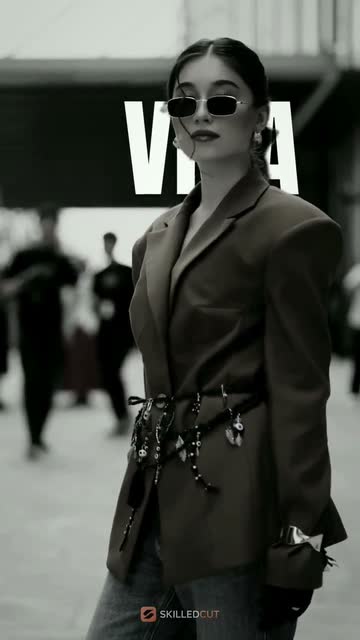 Big WordOne big keyword lands behind your head on every beat, in your own room, with tag chips flying in./big-wordSee it
Frequently asked questions
Short answers to what people ask before they try it.
What is UGC video editing?
It is editing user-generated or creator clips into finished posts and ads: cutting pauses, choosing hooks, adding captions and calls to action, and making versions to test.
How many variants should a brand make from one UGC clip?
Three to five is a practical start. Change one thing per variant, such as the hook or length, so results show what worked.
Can I re-edit a creator's video without asking?
Only if your agreement grants editing and the usage you plan. Check rights for paid ads, duration and platforms before running variants.
Does SkilledCut add fake words or AI footage to UGC?
No. On-screen text comes from what the creator actually said or what is visible in the clip, and the video is the creator's real footage.
Can I edit UGC on Windows or Linux?
Yes, the talking-head templates, captions and effects run on Windows and Linux. Float Ad, the product-photo template, is Mac only for now.
Keep reading
UGC
UGC editing checklist
A checklist for editing UGC videos before delivery: trim, captions, audio, framing, safe zones, brand notes and export. Use it every time.
ReadUGC
UGC-style ads: plan, test and edit
UGC-style ads look like organic posts. How to plan them, test hooks, edit consistently and avoid claims that break platform rules.
ReadUGC
UGC usage rights and licensing basics
What usage rights mean in UGC: where, how long and in what channels a brand may use a video. General information, not legal advice.
ReadUGC
How to brief UGC creators
A UGC brief template: goal, audience, key messages, dos and don'ts, format, deadline and usage rights. Avoid vague briefs and endless revisions.
ReadBlog
AI video editing for agencies: a pipeline for many clients
Set up AI video editing for agencies: one template per client, an intake folder, saved prompts, review rounds and delivery that scales without new hires.
Read
More in the blog or all 16 templates.
Your next Reel is one prompt away.
One payment for every template, effect, voice and workflow, plus all upcoming templates. Pay once, use forever.