

4 min readUpdated
Animated numbers in video: when to count up, when to hold still
Short answer
Animated numbers in video work when the number is the point of the line: a result, a price, a deadline or a before-and-after. Count up for growth, flip down for urgency, hold still for a price. Show one number at a time, say it out loud as it lands, round it, and keep it above the caption area.
On this page
Why numbers deserve their own animation
A number is the most concrete thing you can say in a short video. 'My course helped a lot of people' is forgettable; 'four hundred students in six months' is a claim the viewer can picture. But spoken numbers are also easy to miss, especially on Instagram Reels and TikTok where many people watch muted. Putting the number on screen, with motion that matches its meaning, makes sure it registers.
Animation adds meaning a static number cannot. A count that climbs from zero shows growth. A clock that flips three, two, one shows urgency. A graph that rises under the number shows a trend. Choosing the right motion is the whole craft.
Five kinds of animated number
Prices are the one case where a count-up hurts. A price that spins up from zero feels like it is increasing, which is the opposite of what you want. Let prices appear still and clean.
| Type | Motion | Best for |
|---|---|---|
| Running counter | Counts up from zero to the figure | Growth, totals, followers, revenue |
| Giant counter or stat card | The figure lands big and holds | A single headline result |
| Graph with a number | A line climbs while the number counts | Trends over time |
| Countdown | A 3, 2, 1 flip | Deadlines, launches, list intros |
| Price or total | Lands still, sometimes with a receipt or tag | Prices, bills, costs |
Rules for numbers on screen
There is also an honesty rule. Only animate numbers you can stand behind. A counter adds authority, which makes an invented or inflated figure worse, not better.
- Round it. '2.4K' or 'over two thousand' reads faster than '2,417'.
- One number per beat. Two numbers on screen at once force the viewer to compare instead of absorb.
- Say it as it lands. The figure should appear on the word, not before you say it.
- Give it a label. A number alone is a puzzle; '400 students' is a fact.
- Size it for a phone. The figure should be readable at arm's length, so it often fills a third of the width.
- Keep it above the bottom of the 9:16 frame, where captions and platform buttons sit.
How long should a counter run?
Shorter than you think. A count-up that takes the whole sentence makes the viewer wait for the payoff. Let it run for roughly the time it takes to say the number and its label, then hold the final figure for a beat so it can be read. Ease the count so it slows near the end; a counter that stops abruptly at full speed feels mechanical.
For countdowns, match the beat to your speech. If you say 'three things', a 3, 2, 1 flip in the second before the first item works well; a countdown that runs over your words competes with them.
Effects and templates that animate numbers
SkilledCut's motion graphics include giant counters, stat cards and running counters, chosen per template, and several single effects are built around a number. They take the figure from your own words, so the number on screen is the number you said.
- Liquid glass graph: a glass card under your chin while a graph climbs and the number counts up.
- Select resize: a selection box grabs your number and a cursor drags it bigger, for one figure that needs emphasis.
- Countdown flip: a 3, 2, 1 flip clock above your head.
- Profile wall: your profile grid fills the wall behind you while a counter ticks up, made for follower milestones.
- The bill: your line prints like a receipt into the wall above your head, a natural fit for prices and costs.
- Layers: a full motion-graphics edit with charts and cards behind you, for videos with several figures.
How to ask for an animated number
Drag your clip into your AI agent and point at the number. A prompt that works: "/effects liquid-glass-graph when I say four hundred students." In Claude Code or the Code tab of Claude Desktop that runs as typed; in Codex or Cursor paste the same sentence. SkilledCut finds the word in your transcript, places the effect on it and renders on your computer.
For a video with a few figures, a template does the planning for you: "/layers on my latest video, make the growth numbers into counters". If you teach with numbers, Explainer puts key points on screen as you speak, and Wine has an arrow tile over a falling red line for a decline. The prompt library has more sentences you can copy.
Templates for this
Ask your AI agent for any of them by name. Every template is included with SkilledCut, plus all upcoming ones.
 LayersA full motion-graphics edit from one plain clip: words behind your head, plates, charts and cards./layersSee it
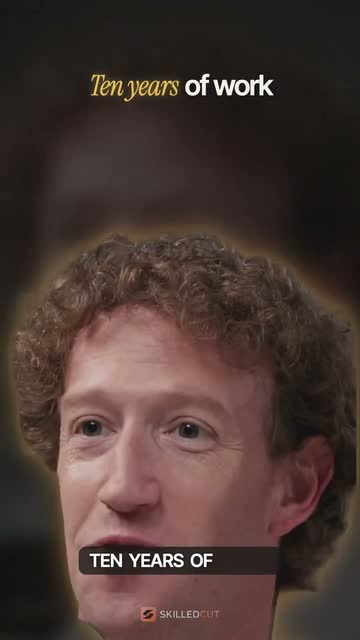 ExplainerTurns a talking clip into a clear lesson with gold word-by-word captions and points on screen./explainerSee it
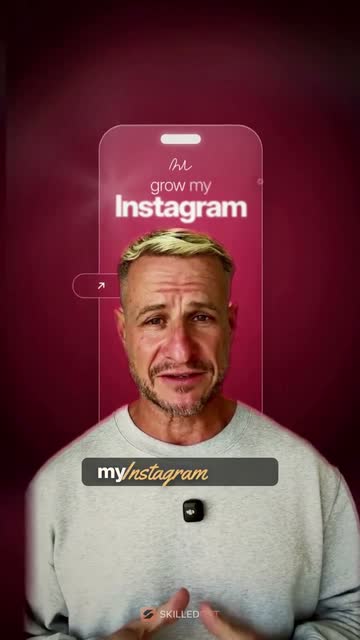 WinePuts you in a wine-red studio with a glass phone card behind your head and your words popping in as you say them./wineSee it
Frequently asked questions
Short answers to what people ask before they try it.
Should a number count up or just appear?
Count up for growth and totals. Let prices and fixed facts appear still, because a counting price looks like it is rising.
How many numbers can a short video show?
One per beat, and usually no more than three in a 30-second reel. If you have more, make a chart or split the video.
Can I add a counter without After Effects?
Yes. Effects such as Liquid glass graph and Profile wall add animated numbers to a clip on your computer from one sentence to your AI agent.
What if I did not say the number out loud?
SkilledCut puts your spoken words on screen, so say the figure in the clip. A number the viewer sees and hears at once is also easier to remember.
Do animated numbers work on YouTube Shorts and TikTok?
Yes. Keep them in the upper or middle part of the 9:16 frame so the caption area and buttons do not cover them.
Keep reading
Glossary
What is motion graphics?
Motion graphics are animated graphic elements such as text, shapes and charts. Definition, uses in talking videos and tools that create them.
ReadUse cases
Motion graphics for talking-head videos, without After Effects
Add charts, cards, plates and a word behind your head to a talking clip without After Effects. How the Layers template builds motion graphics for you.
ReadShort-form growth
How to make educational Reels people save
Teach one idea, show it quickly and make it reference-worthy: structure, on-screen text and a caption that adds a checklist.
ReadBlog
Kinetic typography for reels: how to make words move with your voice
How kinetic typography works in Reels, TikTok and Shorts: timing words to speech, weight, safe-zone placement and templates that animate type.
Read
More in the blog or all 16 templates.
Your next Reel is one prompt away.
One payment for every template, effect, voice and workflow, plus all upcoming templates. Pay once, use forever.