

4 min readUpdated
How to batch edit reels in one two-hour weekly session
Short answer
To batch edit reels, collect the week's raw clips in one folder, give each a one-line brief, then run them through the same template one after another. Review every render once, fix with short follow-up prompts, and schedule the lot. With SkilledCut, an AI agent drafts and checks each reel while you review.
On this page
What does a weekly editing session look like on the clock?
Batch recording gets all the attention, but the editing block is where most weekly plans fall apart. Raw clips pile up, each one gets edited on a different evening in a slightly different style, and Sunday becomes catch-up day. A fixed two-hour session, same day and time each week, solves both problems.
Here is a timed plan for five to seven reels. Adjust the minutes once you know your own pace.
| Time | Task | Output |
|---|---|---|
| 0:00 - 0:15 | Gather and rename clips, write a brief line for each | A clean queue |
| 0:15 - 0:25 | Send the first clip, check the plan the agent proposes | One approved direction |
| 0:25 - 1:10 | Queue the remaining clips with the same template | Drafts rendering one by one |
| 1:10 - 1:40 | Watch each render, send fix-it follow-ups | Final cuts |
| 1:40 - 2:00 | Covers, captions for the post, schedule | A booked week |
How do you prepare the queue?
Put every raw clip for the week into one folder, then rename them so the order and topic are obvious: 01-pricing-myth.mp4, 02-three-tools.mp4 and so on. A good file name doubles as your brief and helps the agent find the right file when you refer to it in plain words.
Next, write one line per clip in a notes file: the keyword you want on screen, the call to action and anything to cut. For example: "02-three-tools: keyword TOOLS, end on Comment STACK, cut the cough at the start". That line becomes your prompt, so the editing itself is mostly pasting.
Check each clip plays and has sound before the session. Fixing a silent file mid-batch costs more time than anything else.
Why use one template for the whole batch?
Mixing looks inside one week makes a feed feel random, and it doubles the decisions you make per reel. Pick one template for the batch and keep it unless a clip clearly needs something else.
Wine works for any clip length and gives every reel the same wine-red studio and glass phone card. Bold suits a week of punchy 10-second hook reels, with giant blue words slamming in behind you. Big Word keeps you in your own room with one keyword per beat. Rotating templates by week, not by reel, keeps variety without chaos.
What do you type for each reel?
Start with the first clip and watch the plan closely; it sets the standard for the batch. In Claude Code or the Code tab of Claude Desktop, the first prompt might be "/wine on 01-pricing-myth.mp4, keyword MYTH, end on Follow for part two". In Gemini CLI it is the same /wine line; in VS Code with Copilot use /mcp.skilledcut.wine; in Codex or Cursor paste the sentence.
Once the first reel looks right, queue the rest in one message: "Same style for clips 02 to 06 in this folder, using the keywords from notes.txt. Show me one still per reel before final render." SkilledCut renders one at a time on your computer; while it works, the agent checks each result for a visible face, steady loudness and black or frozen frames, and fixes what it sees, up to two rounds.
How do you review and fix quickly?
- Watch each finished reel once at full speed with sound on, the way a viewer would.
- Note only real problems: a wrong keyword, a weak first three seconds, text near the bottom buttons, a cut that clips a word.
- Send short fix-it follow-ups such as "reel 03: start at 'Most people get this wrong'" or "reel 05: swap the keyword to SAVE".
- Add a finishing effect only where it earns its place, for example the checklist effect on a list reel or comment box when you answer a viewer.
- Read the short quality report next to each file in Downloads before you call it done.
How do you hand the batch to your scheduler?
Finished files land in Downloads as "name - SkilledCut workflow.mp4". Move them into a dated folder, pick a cover frame for each, and write the post caption while the reel is fresh in your mind. Then schedule across the week in your usual tool for Instagram Reels, TikTok or YouTube Shorts.
Keep one spare reel unscheduled. When a week goes badly, that spare protects your posting rhythm. For the full week around this session, see the weekly content batch workflow, and grab ready batch prompts from the prompt library.
Templates for this
Ask your AI agent for any of them by name. Every template is included with SkilledCut, plus all upcoming ones.
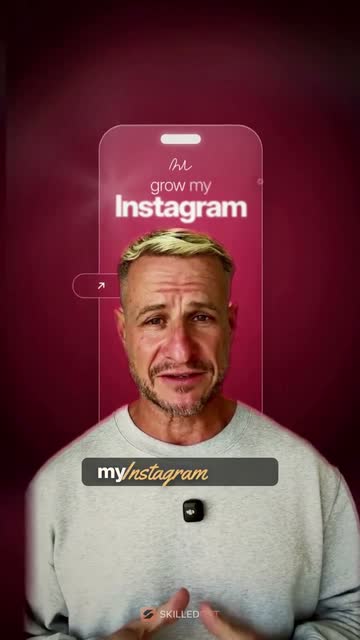 WinePuts you in a wine-red studio with a glass phone card behind your head and your words popping in as you say them./wineSee it
 BoldA 10-second reel where giant words slam in behind you and captions pop word by word./boldSee it
 Big WordOne big keyword lands behind your head on every beat, in your own room, with tag chips flying in./big-wordSee it
Frequently asked questions
Short answers to what people ask before they try it.
How many reels can I batch edit in one session?
Five to seven fits comfortably in two hours once you have a routine. Render time depends on your computer and clip length.
Should every reel in a batch use the same template?
Usually yes. One template per week keeps the feed consistent and cuts decisions. Rotate templates between weeks for variety.
Can SkilledCut render several reels at the same time?
It renders one at a time so each job gets your computer's full power. Queue the clips and review finished ones while the next renders.
Do I need an AI agent to batch edit?
No. In a terminal, run a shortcut such as skilledcut wine clip.mp4 for each file. An agent adds hook choice and self-review on top.
What if one reel in the batch looks wrong?
Send a short follow-up naming the reel and the fix, such as a new start line or a different keyword. Only that reel renders again.
Keep reading
Workflows
Workflow: a weekly batch of five short videos
A weekly batch routine: plan on Monday, script and film in one session, edit in one pass, review and schedule. Time blocks and checks included.
ReadHow-to guides
How to batch edit short videos
Edit many short videos at once: consistent style, naming, a review pass and fast export. A workflow that keeps quality while saving hours.
ReadShort-form growth
How to batch record short videos in one session
Film a week of short videos in one sitting: prepare scripts, set up once, change shirt and background, record in order and label files.
ReadBlog
A short video content calendar that plans the edit, not just the topic
A short video content calendar that plans the edit as well as the topic: pillars matched to templates, a 4-week sample and columns that speed editing.
ReadFor creators
Creator burnout and sustainable posting
Avoid burnout with batching, a realistic rhythm, templates, rest weeks and tools that cut repeated work. Warning signs and what to change.
Read
More in the blog or all 16 templates.
Your next Reel is one prompt away.
One payment for every template, effect, voice and workflow, plus all upcoming templates. Pay once, use forever.