

4 min readUpdated
AI video editing prompts that work, with examples for every kind of reel
Short answer
Good AI video editing prompts name four things: the style or job, the clip, the platform and the one detail you care about most. "Make a Plum reel from my latest video for Instagram, end on the word patience" beats "edit my video nicely". Then use short follow-ups to fix the hook, words or placement.
On this page
The four-part prompt formula
An AI agent directing an edit has to make dozens of small decisions. Every one you settle in the prompt is one it does not have to guess. In practice four parts cover almost everything:
| Part | What to say | Example |
|---|---|---|
| Style or job | A template, workflow or effect by name | Plum reel, karaoke captions, three Shorts |
| Clip | File name, path, attached file or latest | my latest video, ep22.mp4 |
| Platform | Where it will be posted | for Instagram Reels, for a YouTube Short |
| The one detail | The thing you would fix first if it came out wrong | end on the word patience, hook is the line about rent |
You do not need all four every time. Style plus clip is a complete prompt; the other two raise the hit rate.
Prompts for talking-head reels
Notice the pattern: each prompt names a look and then one specific moment. Agents choose hooks well, but if you already know your best line, quoting it removes the guesswork.
- "Make a Plum reel from my latest video for Instagram, end on the word patience."
- "/wine on studio-take.mp4. My key words in the phone card, and open with: most people quit in week two."
- "/bold on my podcast clip, 10 seconds, the giant word on 'compound'."
- "Make a Glass reel from my latest video. Frosted cards on my three tips, nothing over my face."
- "/throwback on rant.mp4 for TikTok, start at the line about my first job."
Prompts for teaching and explainers
Explainer and Layers respond well to structure words: steps, points, list, number. If you say them in the clip and mention them in the prompt, the agent can place chapter tags and counters exactly where they belong. It will not add a number you never said.
- "/explainer on lesson-3.mp4. A title line above my head and one visual for each of the three steps."
- "Use Notebook on my interview answer and underline the sentence about pricing."
- "/layers on my latest video. A stat card when I say 40 percent, numbered chapters for the steps."
- "Add the checklist effect on the part where I list what to pack."
Prompts for brands, products and music-only clips
Clips with no speech give the agent nothing to quote, so you supply the words. In Cobalt and Amber, a line break is a vertical bar and the starred word becomes the big keyword. Float Ad and Lookbook take photos rather than video and run on a Mac for now.
- "/cobalt on walk.mp4. Music only, so use these lines: Hi, I'm *MAYA* | made to *MOVE*."
- "/amber on my product clip with these lines: choose *comfort* #Sofas #Recliners."
- "/float-ad on this photo, name Kavi, line Cold-pressed every morning."
- "/lookbook with these eight outfit photos, a flash between looks."
Fix-it follow-ups after the first render
The first render is a draft. Short, specific follow-ups fix it faster than starting over. These are the ones creators use most:
- "Swap the hook for the line about rent."
- "Move the quote card from 0:09 to 0:14."
- "The word is Notion, not motion. Fix it everywhere."
- "Keep captions inside the safe zone; they sit under the buttons on Reels."
- "Fewer cards in the middle, it feels busy."
- "Use karaoke captions instead of pop."
- "Cut it to 15 seconds and keep the ending."
- "Show me the plan first next time, do not render yet."
Prompts that waste a round
| Weak prompt | Why it struggles | Better version |
|---|---|---|
| "Make it viral" | No style, no clip, nothing measurable | "Bold reel from my latest video for TikTok, hook in the first second" |
| "Edit my video nicely" | The agent has to guess the look | "Wine reel from my latest video" |
| "Add some stats" | Only numbers you said can appear | "A stat card when I say 3 clients" |
| "Make it better" after a render | No direction to act on | "Shorter hook and fewer cards after 0:10" |
| "Generate B-roll of a beach" | SkilledCut edits your footage; it does not invent new shots | "Photo cards from my own clip" with Cobalt |
Where to keep your best prompts
Once a prompt works, save it. Many creators keep a note with their four or five house prompts, one per content type, and only change the file name and the detail each week. The prompt library is a good starting set: every template, effect and workflow has a short prompt and a fuller one you can copy and adapt, such as "/notebook on my latest video, my words typed onto the page as I say them". For the short command versions, see the slash command reference.
Templates for this
Ask your AI agent for any of them by name. Every template is included with SkilledCut, plus all upcoming ones.
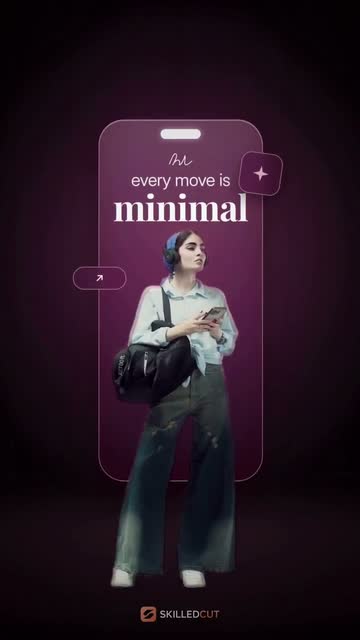 PlumA candle-lit plum studio with a frosted card behind you, serif words, a rose-gold orb and a bold word to close./plumSee it
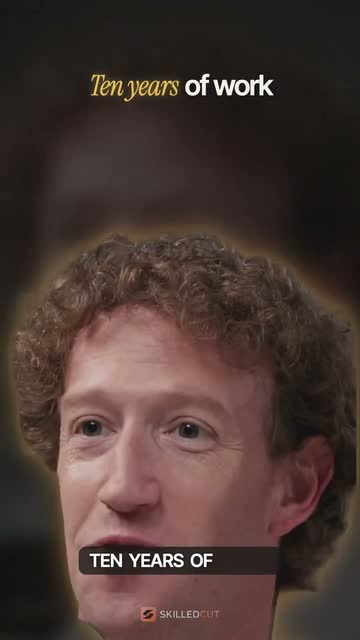 ExplainerTurns a talking clip into a clear lesson with gold word-by-word captions and points on screen./explainerSee it
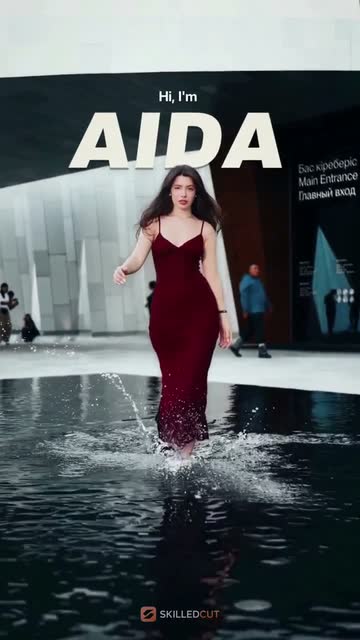 CobaltA bold blue keyword behind your head on every beat, with photo cards from your clip and a bright, clean grade./cobaltSee it
Frequently asked questions
Short answers to what people ask before they try it.
Do these prompts work in any AI agent?
Yes. Sentences work in every MCP-capable agent. Slash commands work in Claude Code, Claude Desktop, Gemini CLI and VS Code Copilot; in Codex, paste the sentence.
How long should an AI video editing prompt be?
One or two sentences is ideal. Longer prompts are fine when the clip has no speech and you are supplying the on-screen lines.
Can I ask for a specific caption style?
Yes. Name pop, karaoke, boxed or minimal in the prompt, for example "/captions karaoke on my latest video".
Why did the agent ignore part of my prompt?
Usually because it asked for something the clip cannot support, such as a number you never said. Only your words or what is visible in the clip go on screen.
Keep reading
Blog
Slash commands for video editing: a reference for every agent
Every SkilledCut slash command for video editing in one place: templates, workflows and effects, how arguments work, and how each AI agent spells them.
ReadBlog
AI agent video editing: a map of who decides what
A map of AI agent video editing: which choices your agent makes, which the renderer makes, where you step in, and how the review loop catches mistakes.
ReadShort-form growth
How to write a hook for the first 3 seconds
Write hooks that hold viewers: six hook types with examples, a test method and the mistakes that lose people in the first seconds of a short video.
ReadHow-to guides
How to choose a caption style for your brand
Choose caption fonts, colours, position and animation by readability first and brand second, with a checklist and examples of when each style works.
ReadGlossary
What is a safe zone in video?
A safe zone is the area of the frame that stays visible and uncovered. Definition, how it applies to vertical video and how to test one.
Read
More in the blog or all 16 templates.
Your next Reel is one prompt away.
One payment for every template, effect, voice and workflow, plus all upcoming templates. Pay once, use forever.