

4 min readUpdated
Comment keyword CTAs on Reels: pick the word, show it, deliver
Short answer
A comment keyword CTA asks viewers to comment one word, such as GUIDE, to receive something by direct message. It works when the reward is specific, the word is short and easy to spell, you say it and show it on screen, and every commenter actually gets what was promised, by hand or with an approved DM tool.
On this page
What is a comment keyword CTA?
You have seen the line: "Comment PLAN and I will send you my template." The viewer types one word, and soon after a direct message arrives with a link, a file or a short answer. It turns a passive viewer into someone who has spoken to you, which is a much warmer start than a link in bio.
For the creator, it also sorts the audience. People who comment the word have told you exactly what they want. That makes the DM thread a natural place to answer a follow-up question or mention a paid offer, without cold pitching anyone.
How do you choose the keyword?
Avoid words that commenters use anyway, such as YES or WOW. If the keyword appears in ordinary comments, an automated reply fires at people who never asked for anything.
- One word, ideally four to six letters: GUIDE, PLAN, LIST, SCRIPT, PRICE.
- Easy to spell on a phone keyboard, with no autocorrect trap.
- Tied to the reward, so the comment itself reminds people what they asked for.
- Different for each offer, so you can tell which Reel brought which request.
- Written in capitals on screen so it stands out from the rest of the text.
Where does the CTA go in the Reel?
Put the main ask after the payoff, once the viewer has seen enough to want more. A quick mention near the start can help too: "Stay to the end for the full checklist, or comment LIST and I will send it." Then repeat it clearly at the close. Saying it once at the end only reaches the people who finished.
Show the keyword on screen while you say it. Many people watch on mute, and a word they can see is a word they can copy. Make it big and central, inside the safe zone, not tucked at the bottom where Instagram's post caption covers it.
| Moment | What to say | What to show |
|---|---|---|
| Hook | The problem or result | Hook title or big word |
| Early mention, optional | "Comment LIST for the full version" | Small pill with the keyword |
| Payoff | The useful part | Points, checklist or proof |
| Close | "Comment LIST and I will send it to you" | The keyword, large and central |
How to make the keyword stand out in the edit
The keyword is the single most important word in the Reel, so give it the biggest treatment. The Big Word template lands one big keyword behind your head on each beat with tag chips flying in, which suits a closing "comment GUIDE" well. Cobalt does the same in a bold condensed blue with a bright grade.
On any clip, the backdrop word effect drops a giant word behind you, and the comment box effect shows a card styled like a comment, which makes the action obvious: this is what you type. Set your real name and handle on the comment card so it does not show placeholder text.
A prompt that does this in one step: "/big-word on my latest video. End on the word GUIDE behind my head while I say comment GUIDE." More CTA prompts are on the prompts page.
How do you deliver what you promised?
The promise only builds trust if it is kept. With a small audience, reply by hand: it is personal and you learn what people ask. As volume grows, many creators use a DM automation tool that connects through Instagram's official messaging access. Use only tools that work through that official access, and read Instagram's current rules on automated messages, since they change.
Whichever route you take, check the replies daily. A comment left without a DM for a week reads as a broken promise, and the viewer remembers it.
- Prepare the reward before you post: the link, file or answer.
- Write the DM in advance: a thank-you, the link and one optional question.
- Reply to the comment too, so others see that it works.
- Track how many people asked per Reel and which keyword they used.
Keeping keyword CTAs useful, not spammy
Used well, the comment keyword is one of the clearest bridges from a short video to a conversation. Pair it with a sensible call to action strategy across your posts so different Reels ask for different things.
- Give the core value in the Reel itself; the DM should add, not withhold everything.
- Do not use the CTA on every post, or your feed becomes a list of asks.
- Never promise results, income or outcomes you cannot back.
- Make the reward match the Reel: a checklist for a checklist video, a script for a script video.
Templates for this
Ask your AI agent for any of them by name. Every template is included with SkilledCut, plus all upcoming ones.
 Big WordOne big keyword lands behind your head on every beat, in your own room, with tag chips flying in./big-wordSee it
 CobaltA bold blue keyword behind your head on every beat, with photo cards from your clip and a bright, clean grade./cobaltSee it
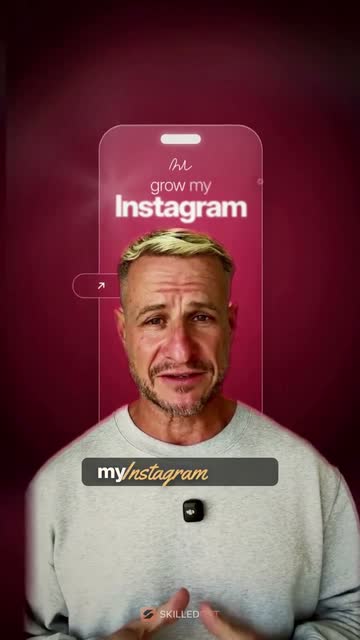 WinePuts you in a wine-red studio with a glass phone card behind your head and your words popping in as you say them./wineSee it
Frequently asked questions
Short answers to what people ask before they try it.
Do comment keyword CTAs help reach?
Nobody outside Instagram knows exactly how comments are weighted, so treat any reach effect as a bonus. The reliable benefit is that commenters become conversations you can follow up.
Do I need an automation tool?
No. Replying by hand works well for small accounts. If you automate, use a tool that connects through Instagram's official messaging access and follow its current rules.
What if people misspell the keyword?
Choose a short, common word and show it on screen. If you automate, add the most likely misspellings as extra triggers.
Can I use the same keyword on several Reels?
You can, if the reward is the same. A different word per offer makes it easier to see which Reel brought which requests.
Will SkilledCut write the CTA for me?
It puts your own words on screen. Say the CTA in your recording and ask your AI agent to give the keyword the big treatment at that moment.
Keep reading
Short-form growth
How to write a call to action for a short video
A call to action asks for one thing. How to choose it, phrase it and place it so it matches the video's goal without sounding pushy.
ReadSocial media
Video for lead generation: a simple funnel
Use video to generate leads: a hook, a helpful answer, one next step and a simple follow-up. How to match videos to funnel stages without a big budget.
ReadSocial media
Community management for creators and brands
Run an active but manageable community: reply rules, moderation, regular touchpoints and turning conversations into content. A weekly routine.
ReadBlog
Reel hook ideas for the first 3 seconds, sorted by goal
Thirty fill-in-the-blank reel hook ideas sorted by goal, plus the visual hook that matches each one: word slams, counters, hook titles and checklists.
ReadBlog
Instagram Reels for coaches: five formats you can film in one session
Five Reel formats coaches can film in one recording session, with a sample outline, the template that suits each and the prompt that edits it.
Read
More in the blog or all 16 templates.
Your next Reel is one prompt away.
One payment for every template, effect, voice and workflow, plus all upcoming templates. Pay once, use forever.