

4 min readUpdated
Personal brand video editing: how to make your videos recognisable
Short answer
Personal brand video editing is about repetition people can recognise: one signature edit style, the same caption look, keywords that sound like you and a consistent ending. Choose these once, write them down as a short style sheet, and apply them to every reel so viewers know it is you before they hear your name.
On this page
What makes a personal brand visible in an edit?
Your message builds the brand, but the edit is how people spot it while scrolling. Viewers recognise a creator in the first second through small repeated cues: the colours, the type, where words appear, the rhythm of cuts, how a video ends. Change all of those every week and even loyal followers scroll past before they realise it is you.
So personal brand video editing is less about clever effects and more about choosing a few signatures and refusing to drift. The five that matter most:
- A signature template or look used on most videos.
- One caption style, colour and position.
- A habit for the keyword that goes big on screen.
- An opening pattern, such as always starting on the claim.
- A consistent ending: same call to action, same final frame.
How do you pick a signature look?
Match the look to how you want people to feel, not to what is trending this month. A few pairings that work:
| Brand personality | Template | What viewers see |
|---|---|---|
| Warm founder, craft and story | Amber | Serif keywords over your head, gold chips, warm grade |
| Premium consultant or coach | Glass | Glass ribbon behind you, frosted cards, glass scenes |
| Elegant, luxury, calm | Plum | Candle-lit plum studio, serif words, rose-gold orb |
| Studio-polished expert | Wine | Wine-red studio, glass phone card with your words |
| Thoughtful interviewer | Notebook | Cream editorial page, words typing on |
| Playful, nostalgic | Throwback | Retro posters behind you that change every line |
Try two finalists on the same clip and post neither yet. Show both to three people who know you and ask which feels like you.
How do captions and keywords carry your voice?
Captions are on screen for the whole video, so they are the strongest brand signal after your face. Pick one of the four caption styles (pop, karaoke, boxed or minimal) and keep it. Pop suits energetic creators; minimal suits calm, premium brands.
Keywords are subtler. If you teach, choose verbs viewers can act on: BUILD, PRICE, CUT. If you lead with story, choose feelings: DOUBT, PROUD, AGAIN. Over months, those word choices become part of how people describe you. Since only words you actually say appear on screen, the habit also nudges you to speak in clear, quotable lines.
How do you write a one-page style sheet?
With the sheet saved, one prompt applies your brand: "Read my style sheet, then /amber on my latest video with keywords from my list and my usual ending". Without an agent, `skilledcut amber clip.mp4` applies the template directly.
- Name your signature template and one backup for special posts.
- Write your caption style, plus any words never to caption, such as a client's name.
- List ten keywords that sound like you, and three you avoid.
- Fix your handle and display name for effects that show a profile, such as comment box.
- Write your standard ending line, for example "Follow for one pricing lesson a week".
- Save the whole sheet as a note your AI agent can read before each edit.
How often should you change your look?
Less often than you think. You will be bored of your look long before your audience notices it. Keep one signature for at least a few months, and judge it on whether new viewers comment that they recognise your videos, not on one weak week.
Variety belongs inside the look: different topics, new hooks, an occasional effect such as spotlight on a big moment or checklist on a list. When you do switch, switch cleanly and tell your audience, so the change reads as a deliberate refresh.
How do you keep it going every week?
Consistency fails when editing is slow. Recording a week's clips in one sitting and editing them in one block with the same template keeps the look identical across posts without extra effort. SkilledCut renders each reel on your own computer, and its automatic checks catch a hidden face, uneven loudness or black frames before you post.
New templates arrive every month in the one-time ₹999 plan, which is useful for an occasional special post without abandoning your signature. Copy-ready personal brand prompts are in the prompt library, and build a personal brand with video covers the strategy side.
Templates for this
Ask your AI agent for any of them by name. Every template is included with SkilledCut, plus all upcoming ones.
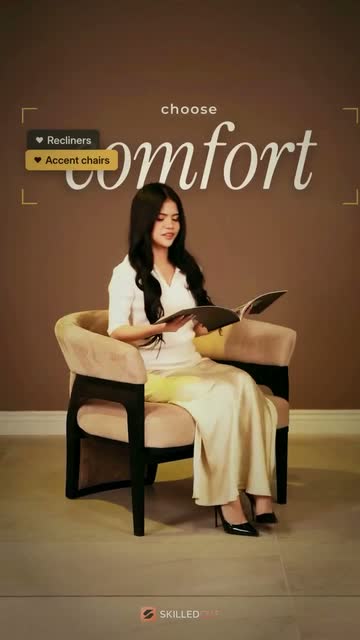 AmberYour key words land big over your head in warm serif type, with gold tag chips flying in, in your own room./amberSee it
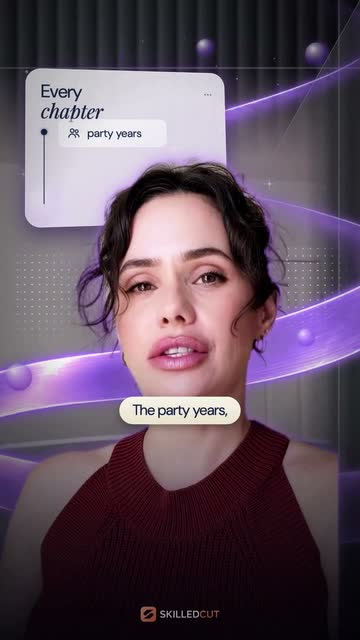 GlassA premium 10-second reel: a glass ribbon behind you, frosted cards and glass scenes cut in./glassSee it
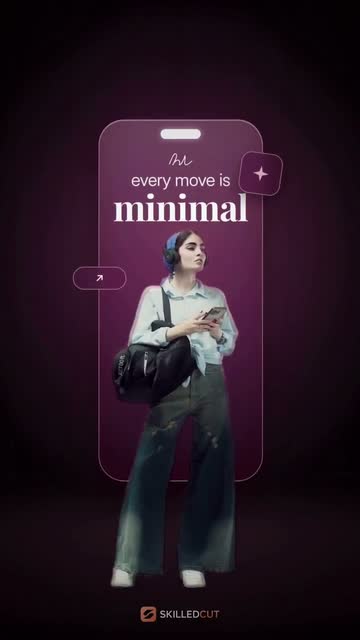 PlumA candle-lit plum studio with a frosted card behind you, serif words, a rose-gold orb and a bold word to close./plumSee it
Frequently asked questions
Short answers to what people ask before they try it.
What is personal brand video editing?
It is editing your videos with repeated, recognisable choices, such as one template, one caption style and a consistent ending, so viewers spot your content instantly.
Should every video use the same template?
Most of them, yes. Keep one signature look for regular posts and one backup for special announcements or series.
Which caption style is best for a personal brand?
The one you keep. Pop suits energetic creators, karaoke suits teaching, boxed suits busy backgrounds and minimal suits calm or premium brands.
Can I set my name and handle once?
Write them in a style sheet your AI agent reads before each edit. Effects that show a profile, such as comment box, then use your real name and handle.
How long before a consistent look pays off?
Give it a few months of regular posting. Recognition builds through repetition, so judge it over many posts rather than one.
Keep reading
For creators
How to build a personal brand with video
Build a recognisable personal brand: a clear promise, consistent look, repeat formats, honest voice and patience. A practical plan with a checklist.
ReadHow-to guides
How to keep a consistent brand across videos
Consistency comes from repeated choices: look, voice, structure and sound. A brand checklist, and how one editing template keeps every video matching.
ReadFor creators
How to build a repeatable video format
A repeatable format makes planning and editing faster: define the structure, length, look and recurring elements, then test and refine it.
ReadBlog
A short video content calendar that plans the edit, not just the topic
A short video content calendar that plans the edit as well as the topic: pillars matched to templates, a 4-week sample and columns that speed editing.
ReadUse cases
Video editing for coaches and consultants
How coaches and consultants can turn one talking clip into a polished reel or lesson without a full editing team. What to film and which template to use.
Read
More in the blog or all 16 templates.
Your next Reel is one prompt away.
One payment for every template, effect, voice and workflow, plus all upcoming templates. Pay once, use forever.