

4 min readUpdated
One-time purchase video editor: what to check before you pay once
Short answer
A one-time purchase video editor charges once instead of monthly, but the price alone does not tell you much. Check what updates are included, how many computers the licence covers, the refund window, supported systems, any separate AI costs and what you keep if you stop. SkilledCut is ₹999 once with a 7-day refund.
On this page
- 1Why do creators look for a one-time purchase video editor?
- 2Which eight things should you check?
- 3How does SkilledCut answer those eight checks?
- 4What about the AI part: is that a hidden subscription?
- 5What do you get for one payment?
- 6When is a subscription editor still the better buy?
- 7Frequently asked questions
Why do creators look for a one-time purchase video editor?
Subscription fatigue is real for creators. A caption tool, a stock library, a scheduler, a design app, a cloud editor: each one is small, together they become a fixed bill whether you posted ten reels that month or none. Paying once for the editor removes one line from that list and makes a slow month cheaper.
But one-time does not automatically mean good value. Some lifetime deals freeze on the version you bought. Some licences cover a single computer. Some need a paid AI service on top. The eight checks below are the questions worth answering before you click buy. If you want the general maths of paying once versus monthly, one-time purchase vs subscription covers it; this page is the buying checklist.
Which eight things should you check?
- What does the price include? Every feature, or a base tier with paid add-ons for captions, effects or voices?
- Are updates included, and for how long? Lifetime of the product, one year, or only bug fixes?
- Is new content included? For template-based editors, ask whether future templates cost extra.
- How many computers? One seat is painful if you edit on a desktop and a laptop.
- Which systems? Mac only, Windows only, or both plus Linux. Check it matches your next computer, not just this one.
- What is the refund window? A few days is enough to install and test on your own footage.
- Are there hidden running costs? Cloud credits, render minutes or a required AI subscription.
- What happens if you stop using it? Do the videos you made stay yours, and do exported files carry a watermark?
How does SkilledCut answer those eight checks?
Full terms are on the pricing page.
| Check | SkilledCut |
|---|---|
| Price | ₹999 one time, one plan, everything included |
| Updates | Included, with lifetime access |
| New templates | New templates every month, included |
| Computers | Two per licence, any mix of Mac, Windows and Linux |
| Systems | Mac with Apple Silicon, Windows 10/11, 64-bit Linux |
| Refund | 7 days if it will not run on your computer and support cannot fix it |
| Running costs | Renders use your computer, not credits. An AI agent is optional |
| Your videos | Yours to post, sell and deliver to clients |
What do you get for one payment?
16 templates today, each a finished edit style. Layers builds a full motion-graphics edit from one plain clip, with words behind your head, plates, charts and cards. Wine gives you a studio look with your words on a glass card. Amber is made for founder and brand intros. Two photo templates turn product shots and outfits into ads and lookbooks on a Mac.
On top of the templates: 50+ studio effects such as checklist and comment box, 25+ on-device voices, and workflows for reels, captions, Shorts and more. A prompt you can try on day one: "/amber on my latest video, keywords FOUNDER, CRAFT and LAUNCH". More lines are in the prompt library.
When is a subscription editor still the better buy?
If none of those apply and you post short video every week, paying once usually wins over a year or two.
- You need real-time collaboration with a team in a browser.
- You edit only once or twice a year and a single month of a subscription covers it.
- Your computer is too old to render locally and you have fast upload speeds.
- You need a huge stock footage or music library that comes bundled with the plan.
Templates for this
Ask your AI agent for any of them by name. Every template is included with SkilledCut, plus all upcoming ones.
 LayersA full motion-graphics edit from one plain clip: words behind your head, plates, charts and cards./layersSee it
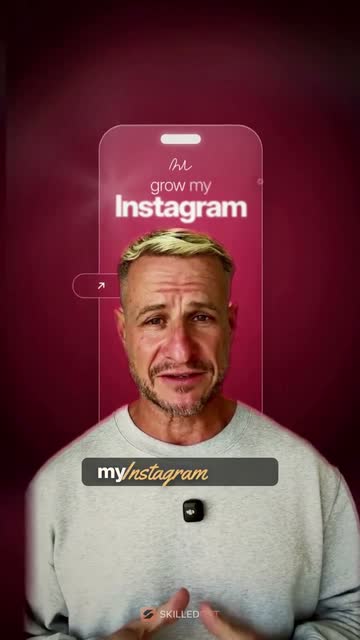 WinePuts you in a wine-red studio with a glass phone card behind your head and your words popping in as you say them./wineSee it
 AmberYour key words land big over your head in warm serif type, with gold tag chips flying in, in your own room./amberSee it
Frequently asked questions
Short answers to what people ask before they try it.
Is SkilledCut really a one-time purchase?
Yes. It is a single payment of ₹999 with no subscription, and it includes the templates available today plus new ones every month.
Do one-time video editors get updates?
It depends on the vendor, so check before buying. SkilledCut is lifetime access, and new templates arrive every month at no extra cost.
Do I need to pay for an AI subscription as well?
No. You can use an AI agent you already have on your current plan, or none. Rendering runs on your computer and never uses AI credits.
What if the editor does not work on my computer?
If SkilledCut will not run on your computer and support cannot fix it, email within 7 days for a full refund.
Can I move my licence to a new computer?
Yes. Each licence works on two computers, and moving to a new one takes a single command.
Keep reading
Software and AI tools
One-time purchase vs subscription software
Compare one-time licences and subscriptions: total cost over time, updates, support and lock-in, with a simple way to work out which is cheaper for you.
ReadBlog
What does video editing cost?
A cost framework for editing reels and talking-head video: hiring, subscription apps, one-time tools and AI. What to count, with a worked example.
ReadSoftware and AI tools
Software licences explained for creators
What licence terms mean for creators: personal vs commercial use, seats, redistribution, client work and refunds. General information, not legal advice.
ReadSoftware and AI tools
How to evaluate an AI tool before you pay
A test plan for AI tools: define the job, use your own footage, check accuracy, privacy and cost, and decide with a scorecard, not a demo.
Read
More in the blog or all 16 templates.
Your next Reel is one prompt away.
One payment for every template, effect, voice and workflow, plus all upcoming templates. Pay once, use forever.