

4 min readUpdated
Sound effects for reels: a sound-to-motion map for creators
Short answer
Sound effects for reels work when every sound matches something the viewer sees: a whoosh for a fast move, a hit for a word that slams in, a pop for a caption or card, a click for a tick or tap, a riser before a reveal. Keep them under your voice, on the exact frame, with silent gaps.
On this page
Why sound effects matter more in short-form video
Instagram Reels, TikTok and YouTube Shorts are watched fast, often with one thumb hovering over the next video. A sound effect tells the ear that something changed a fraction of a second before the eye has fully processed it. That small nudge is why a word that slams in with a low hit feels stronger than the same word arriving in silence, and why a list that clicks as each item appears feels organised.
The trap is treating sound effects as decoration. Random whooshes over a talking head make a reel feel busy and cheap. The rule that fixes almost every case: a sound effect needs a visible reason. If nothing moves, nothing should make a sound.
The sound-to-motion map
Most short-form edits need only six kinds of sound. Learn which on-screen event each one belongs to and you can judge any edit, your own or someone else's.
| Sound | On-screen event | Example |
|---|---|---|
| Whoosh | Something moves fast across the frame | A card slides in, a swipe transition |
| Hit or thud | A heavy word or graphic lands | A giant word slams in behind your head |
| Pop | Something small appears | A word-by-word caption, a keyword pill |
| Click or tick | A box is checked or a button is tapped | A checklist step turns green, a Follow tap |
| Riser | Tension before a reveal | The second before a number or answer appears |
| Glitch or stutter | The frame breaks or cuts hard | A glitch transition between two beats |
Timing and level: the two details that decide it
Timing first. The start of the sound should sit on the same frame as the start of the motion, or one or two frames before it for a hit. A sound that arrives late reads as out of sync, even to viewers who could not say why. Risers are the exception: they end on the reveal, so they start a second or two earlier.
Level second. Your voice is the most important sound in a talking-head reel. Effects should sit clearly below it, loud enough to feel but never loud enough to cover a word. If an effect lands in the middle of a sentence, turn it down further or move it to a pause. After mixing, check the overall loudness so the reel is not much quieter or louder than the videos around it; our loudness guide explains why platforms adjust it anyway.
- Start the sound on the first frame of the motion.
- Keep effects below the voice at all times.
- Prefer pauses between phrases for louder hits.
- Match intensity to the move: small pop for a small card, low hit for a giant word.
How many sound effects is too many?
A useful ceiling is one effect for each visual change, and visual changes in a strong reel come every three to six seconds. In a 15-second talking-head reel that is roughly three to six sounds, not twenty. Word-by-word captions are the main exception: if every word pops, the pop must be very quiet, or dropped entirely, so it does not turn into a ticking clock.
Silence is part of the design. A beat with no effect makes the next hit feel bigger. If every second has a sound, none of them carry weight.
Templates that place sound effects for you
Placing sounds frame by frame is slow work in a timeline editor. Several SkilledCut templates come with their sound design already matched to their motion, so effects land on the right frame without you touching a waveform.
- Bold: sound effects and camera shakes placed on every key word as the giant blue words slam in.
- Glass: exact sound effects and camera shakes on the cuts between you and the abstract glass scenes.
- Wine: sound effects and music under the rack-focus, zoom-through and glitch transitions.
- Float Ad: sound effects placed on the camera moves of a floating product ad made from a photo.
Single effects bring their own motion, and many have a natural sound partner: Reject stamp wants a hit, Checklist a tick, Follow tap a click.
How to ask for it
Drag your clip into your AI agent and name the template, for example "/bold on my latest video" in Claude Code or the Code tab of Claude Desktop. SkilledCut drafts the plan, the agent chooses the key words, and the render, sounds included, runs on your computer. If you already have a finished edit and only want one moment to land harder, ask for a single effect on that word, such as "/effects reject-stamp on the word 'never'".
Ready-made sentences for every template are in the prompt library. Then watch the result twice: once with sound to check that every effect has a visible reason, and once on a phone speaker, where low hits can disappear.
Templates for this
Ask your AI agent for any of them by name. Every template is included with SkilledCut, plus all upcoming ones.
 BoldA 10-second reel where giant words slam in behind you and captions pop word by word./boldSee it
 GlassA premium 10-second reel: a glass ribbon behind you, frosted cards and glass scenes cut in./glassSee it
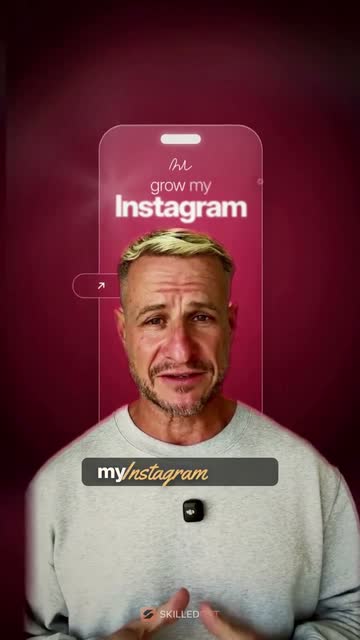 WinePuts you in a wine-red studio with a glass phone card behind your head and your words popping in as you say them./wineSee it
Frequently asked questions
Short answers to what people ask before they try it.
Where do I find sound effects for reels?
Platforms include sound libraries, and many free and paid libraries exist. Check the licence for commercial use. Templates such as Bold, Glass and Wine come with their sound design included.
Should sound effects be louder than music?
Usually yes for a short hit, but both stay below your voice. Music is a bed; effects are short accents.
Do sound effects work if viewers watch muted?
No, so never rely on a sound alone to carry meaning. Pair every important moment with a visual and captions.
Can I add sound effects to a talking-head video with no graphics?
Use them on cuts and punch-ins instead. A quick punch-in on one word with a soft hit is enough to mark the moment.
How do I stop sound effects sounding cheesy?
Use fewer, match each one to a visible move, keep them under your voice and pick sounds that fit the look, such as soft pops for a clean style and heavier hits for a bold one.
Keep reading
How-to guides
How to use sound effects in short videos
Sound effects add punch to cuts and text. Where to use them, how loud, and how to avoid cheesy overuse. Licensing basics included.
ReadGlossary
What does SFX mean? Sound effects in video
SFX meaning in video: non-speech sounds like whooshes and hits. The common types, and how to use them without clutter or burying speech.
ReadHow-to guides
How to choose background music for videos
Pick music that supports the message: tempo, mood, volume under speech and licensing. A short guide with a checklist for safe, clear mixes.
ReadHow-to guides
How to normalise audio loudness for social video
Make speech consistent between clips: understand LUFS, peaks and dynamics, and set a safe target before you export.
ReadBlog
Kinetic typography for reels: how to make words move with your voice
How kinetic typography works in Reels, TikTok and Shorts: timing words to speech, weight, safe-zone placement and templates that animate type.
Read
More in the blog or all 16 templates.
Your next Reel is one prompt away.
One payment for every template, effect, voice and workflow, plus all upcoming templates. Pay once, use forever.