

Templates in depth3 min readUpdated
A studio look for talking-head videos: Wine, Plum or Amber
Short answer
Wine and Plum cut you out of your room and place you in a designed studio, wine-red or candle-lit plum, with a glass card of your words behind your head. Amber keeps your own room and grades it warm, with a big serif keyword over your head. Choose a studio swap or a graded room.
On this page
What is the difference between swapping the room and grading it?
Two ideas sit behind these three templates. Wine and Plum cut you out of the frame and put you in a made-up studio, so the room you filmed in no longer matters. Amber keeps your own room and gives it a warm, dark grade, with the keyword laid over your head and your head kept in front of the word.
The first suits a messy or plain background. The second suits a room that already looks good.
What does Wine look like?
Wine is a wine-red seamless studio. A frosted glass phone card sits behind your head, and your words pop into it as you say them. Later an arrow tile appears over a falling red line, a gold orb builds your line in orange pixels and fans out glass cards, and a heavy word lands over your head to close. Rack focus, a zoom-through and a glitch move between the parts, and music and sound effects come with it.
It works on any clip length and suits advice and tips.
What does Plum look like?
Plum is a candle-lit plum studio with a frosted phone card behind you and serif words that pop in. A glossy rose-gold orb builds the line in pixels and fans out plum glass cards, a countdown tile or arrow appears, a black-and-white glitch hit lands, and a bold serif word closes the reel. It also handles a full-body person walking through frame, and a clip with music and no speech when you supply the lines.
What does Amber look like?
Amber is quieter. A small lead line and one big serif keyword land on each beat, gold tag chips fly in with corner brackets and a light streak, and an optional list beat and brand end card close it. The grade is warm and dark. It suits founder intros, brand films and luxury products, in your own room.
How do you choose between them?
| If your clip is | Choose | Because |
|---|---|---|
| In a plain or messy room | Wine | The studio replaces the background |
| A softer, more editorial mood | Plum | Candle-lit plum and serif type |
| In a room that already looks good | Amber | It grades the room instead of replacing it |
| A clip with only music | Amber or Plum | Both take your own on-screen lines |
Make it with your AI agent
Type "/wine on my latest video" in Claude Code, Codex or Cursor with the clip attached: studio background talking head video, handled on your computer. Copy more in the prompt library or see the Wine template.
Templates for this
Ask your AI agent for any of them by name. Every template is included with SkilledCut, plus all upcoming ones.
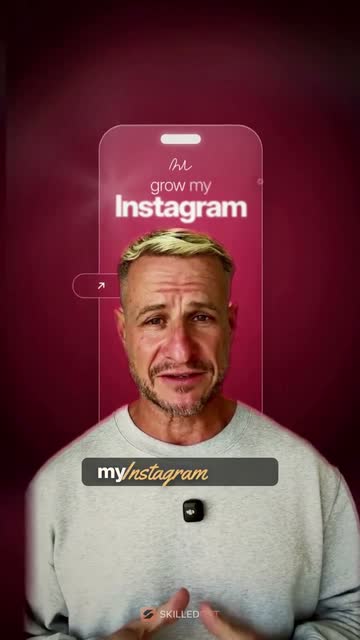 WinePuts you in a wine-red studio with a glass phone card behind your head and your words popping in as you say them./wineSee it
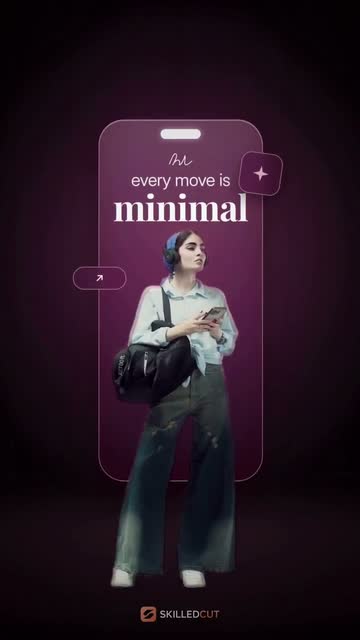 PlumA candle-lit plum studio with a frosted card behind you, serif words, a rose-gold orb and a bold word to close./plumSee it
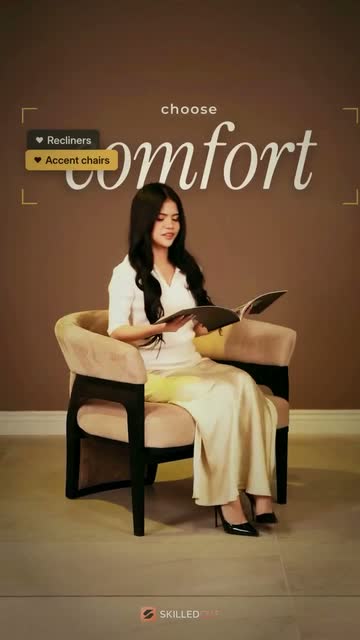 AmberYour key words land big over your head in warm serif type, with gold tag chips flying in, in your own room./amberSee it
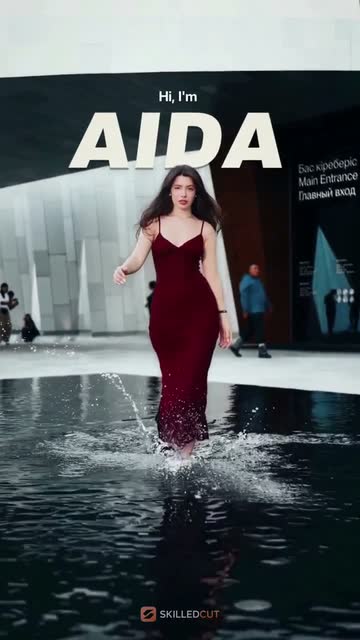 CobaltA bold blue keyword behind your head on every beat, with photo cards from your clip and a bright, clean grade./cobaltSee it
Frequently asked questions
Short answers to what people ask before they try it.
Do Wine and Plum need a green screen?
No. They cut you out of your own background automatically, so a plain wall works, though a clear edge between you and the background helps.
Can I use Amber on a clip with no speech?
Yes. Amber takes your own on-screen lines for a clip with music only, such as a product or fashion clip.
Which one suits a full-body clip?
Plum handles a full-body person walking through frame. Wine is built around a head-and-shoulders talking shot.
Can I change the studio colour?
Each template has its own palette, wine-red for Wine and plum for Plum. Ask your AI agent for a different template if you want another colour world.
How long should the clip be?
Wine works on any length. For a reel, ask for a length of about nine seconds, and a longer clip repeats the sequence.
Keep reading
How-to guides
How to make a talking-head video look cinematic
Depth, light, framing and a restrained grade: the choices that make a single-camera talking clip look polished rather than flat.
ReadHow-to guides
How to light a talking-head video
Simple lighting for talking videos: face a window, add a soft fill, avoid mixed colours and keep your edges clear so cutouts and captions look clean.
ReadHow-to guides
How to remove a video background without a green screen
How AI subject matting works, what footage cuts out cleanly, and how to get a usable result from a plain room and good lighting.
ReadBlog
SkilledCut's {{count}} templates compared: which one for which video
Wine, Plum, Amber, Cobalt, Big Word, Notebook, Throwback, Float Ad, Lookbook and more: what each template does and which video it suits.
ReadBlog
Big Word, Cobalt or Amber: which keyword reel template should you use?
Three templates put one big keyword on every beat of a reel. Big Word, Cobalt and Amber compared by type, grade and the footage each suits.
Read
More in the blog or all 16 templates.
Your next Reel is one prompt away.
One payment for every template, effect, voice and workflow, plus all upcoming templates. Pay once, use forever.