

Templates in depth3 min readUpdated
Big Word, Cobalt or Amber: which keyword reel template should you use?
Short answer
Big Word, Cobalt and Amber all land one big keyword on each beat of your reel, in your own room. Big Word is the flexible one with several looks, Cobalt uses a bold blue keyword behind you with photo cards and a bright grade, and Amber uses a serif keyword over your head with gold chips and a warm grade.
On this page
What do the three have in common?
All three are keyword reels. On every beat a small lead line and one big word land, you stay in your own room, and your head sits in front of or over the word, so you never disappear behind the type. Tag chips or photo cards fly in around it, and an optional list beat and brand end card finish the reel. Each works on a clip with speech, and each accepts your own on-screen lines for a clip with only music.
What sets Big Word apart?
Big Word is the base template and the most flexible. It has several looks you can switch between, including a monochrome default and versions that borrow the warm or the blue style of its siblings. Choose it when you want the idea without committing to one colour world, or when you want to try the same clip in more than one look.
What sets Cobalt apart?
Cobalt is loud and clean. The keyword is a bold condensed cobalt blue set behind your head, photo cards pulled from your own clip fly in, a 3D word lands on your chest, and the grade is bright. It suits street, fashion and product footage, and reels that open with a name or a brand word.
What sets Amber apart?
Amber is the premium one. The keyword is a serif set over your head, gold tag chips and corner brackets frame it, a light streak crosses the screen, and the grade is warm and dark. It suits founder intros, brand films and luxury goods.
How do you pick one for your clip?
| If you want | Choose | Why |
|---|---|---|
| Flexibility, or to try a few looks | Big Word | Several looks in one template |
| A loud, bright street or fashion reel | Cobalt | Blue keyword, photo cards, bright grade |
| A premium, warm brand feel | Amber | Serif keyword, gold chips, dark warm grade |
| One word and nothing else, in 10 seconds | Bold | Giant words behind you, no extra chips |
What do you write for a clip with no speech?
A music-only clip needs your own lines. Write short phrases separated by a bar, and mark the key word with asterisks, for example: choose *comfort* | what makes a chair: style, shape, *presence*. Your AI agent passes the lines to the template, which puts each one on a beat. Never invent words for a clip where someone is already speaking, because the template takes the words from the speech.
Make it with your AI agent
Type "/big-word on my street-style clip" in Claude Code, Codex or Cursor with the clip attached: big word video template, handled on your computer. Copy more in the prompt library or see the Big Word template.
Templates for this
Ask your AI agent for any of them by name. Every template is included with SkilledCut, plus all upcoming ones.
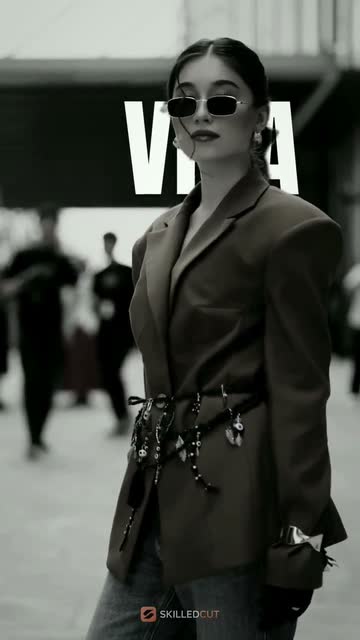 Big WordOne big keyword lands behind your head on every beat, in your own room, with tag chips flying in./big-wordSee it
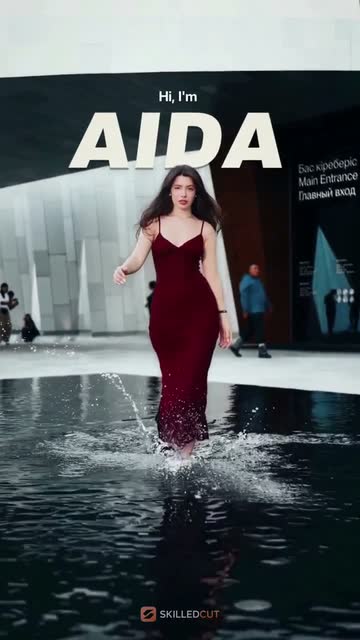 CobaltA bold blue keyword behind your head on every beat, with photo cards from your clip and a bright, clean grade./cobaltSee it
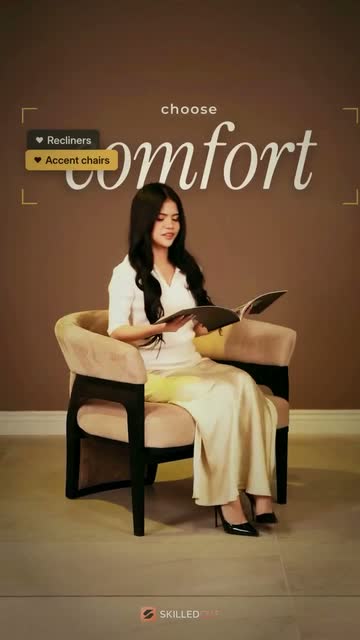 AmberYour key words land big over your head in warm serif type, with gold tag chips flying in, in your own room./amberSee it
 BoldA 10-second reel where giant words slam in behind you and captions pop word by word./boldSee it
Frequently asked questions
Short answers to what people ask before they try it.
Which one is best for a founder intro?
Amber suits a founder or brand intro, with a serif keyword, gold tag chips and a warm grade in your own room.
Can the keyword be a word I choose?
For a clip with speech, the keyword comes from what you say. For a clip with only music, you write the lines and mark the key word.
Do these cut me out of my room?
No. They keep your own room and place the word relative to your head, with your head in front.
Can I switch the look in Big Word?
Yes. Big Word has several looks, with a monochrome one by default and others in the warm and blue styles of its siblings. Ask your AI agent for the look by name.
How is Bold different from these three?
Bold is a 10-second reel with giant blue words slamming in and camera shakes, and no chips or photo cards. It is shorter and louder.
Keep reading
Use cases
How to put big text behind your head in a video
Put a giant word behind your head on key words with Layers or Bold. What the effect is, how to film for it and how to get it with your AI agent.
ReadBlog
A studio look for talking-head videos: Wine, Plum or Amber
Put a designed studio behind your talking head, or grade the room you have. Wine, Plum and Amber compared by backdrop, mood and the clips each suits.
ReadHow-to guides
How to keep a consistent brand across videos
Consistency comes from repeated choices: look, voice, structure and sound. A brand checklist, and how one editing template keeps every video matching.
ReadBlog
Video effects for talking-head reels: the 50+ effects, by what they do
The 51 SkilledCut effects in five groups, what each is for, and how to pick three for one reel without clutter. Add any of them with a sentence.
ReadBlog
SkilledCut's {{count}} templates compared: which one for which video
Wine, Plum, Amber, Cobalt, Big Word, Notebook, Throwback, Float Ad, Lookbook and more: what each template does and which video it suits.
Read
More in the blog or all 16 templates.
Your next Reel is one prompt away.
One payment for every template, effect, voice and workflow, plus all upcoming templates. Pay once, use forever.