

4 min readUpdated
Video editing for non-editors: direct the edit instead of learning the software
Short answer
Video editing for beginners without skills works best when you stop trying to operate an editor and start directing one. Learn ten editing words, film a clean clip, describe the result in a sentence to an AI agent, pick a finished style, then check five things before posting. The judgement is yours; the clicking is not.
On this page
The shift: from operator to director
Traditional advice for beginners is to pick an editor and practise until the shortcuts feel natural. That works if you want to become an editor. Most creators, coaches and small business owners do not. They want a good Instagram Reel or YouTube Short on Thursday, and every hour spent learning keyframes is an hour not spent on the message.
AI editing tools change what skill means. The scarce skill is no longer moving clips on a timeline; it is knowing what a good edit looks like and being able to describe it. That is the same skill a film director has, and you can learn its basics in an afternoon. If you would rather learn the software properly, our guide on learning video editing fast is the better path. This post is for everyone else.
Ten words that let you direct any edit
You do not need jargon, but these ten terms make your instructions precise and save rounds of back and forth.
| Word | What it means | How you would use it |
|---|---|---|
| Hook | The first 1 to 3 seconds | "Start on the line about the mistake" |
| Cut | Removing a section | "Cut the pauses and the retake" |
| Jump cut | A cut inside one continuous shot | "Jump cuts are fine, keep it fast" |
| Punch-in | A quick zoom on the speaker | "Punch in on 'never'" |
| B-roll | Footage that is not you talking | "Show the product on top while I talk" |
| Captions | On-screen words of what you say | "Boxed captions, small" |
| Safe zone | The area platform buttons do not cover | "Keep text out of the bottom" |
| Grade | The colour mood | "Warm, not orange" |
| Beat | One idea or visual change | "A new visual every beat" |
| Call to action | What you ask viewers to do | "End on 'comment GUIDE'" |
What to film so the edit is easy
A non-editor's best editing tool is a clean recording. Every problem you avoid on camera is one you never have to describe later.
- Film vertically, at eye level, with your face in the upper middle of the frame.
- Face a window or a soft light so your face is the brightest thing in the shot.
- Use any external mic you have, even wired earphones, and record in a quiet room.
- Say the strongest sentence first, then the rest. If you fumble, pause and repeat the line; retakes can be cut.
- Leave a second of stillness at the start and end.
Our guide to recording a talking head on a phone goes deeper on setup.
Pick a finished style instead of designing one
Designers spend years developing taste in type, colour and motion. You can borrow theirs. A template is a finished edit style: you bring the clip, it brings the look. With SkilledCut you choose one by the outcome you want rather than by its settings.
If you want a polished studio look without a studio, Wine puts you in a wine-red studio with your words popping in on a glass card behind your head. If you teach, Explainer adds gold word-by-word captions and key points. If you want one strong word on every beat, Big Word does exactly that. Browse all thirteen on the templates page and pick the one whose demo makes you think 'that, but me'.
How to ask for the edit
SkilledCut is an AI video editor that runs on your own computer. Your AI agent, such as Claude, Codex, Cursor or Gemini CLI, directs the edit: SkilledCut drafts a plan, the agent picks the hook and the words to highlight, SkilledCut renders, and automatic checks plus stills go back to the agent so it can fix what it sees. You talk to it in plain sentences.
Three starter prompts: "/cutpauses on my latest video" when you only want the dead air gone; "/reel on this clip" for a captioned reel with visuals; "/wine on my latest video, the hook is the line about pricing" for a full styled edit. The prompt library has copy-ready versions for every template. No AI agent? The quick mode runs from a terminal: `skilledcut reel clip.mp4`. Setup is one prompt or one line, explained in getting started.
Five checks before you post
If something is off, describe the fix in one sentence, such as "move the big word to 'free'" or "trim the last second", and re-render. That loop is the whole job of a director.
- Watch the first three seconds with the sound off. Do you know what the video is about?
- Check that no text covers your face or sits in the bottom strip where the caption and buttons go.
- Read the captions once for names and numbers; speech recognition can mishear them.
- Listen on a phone speaker. Is your voice clear above any music?
- Watch the last second. Does it end on your point or call to action, not on you reaching for the phone?
Templates for this
Ask your AI agent for any of them by name. Every template is included with SkilledCut, plus all upcoming ones.
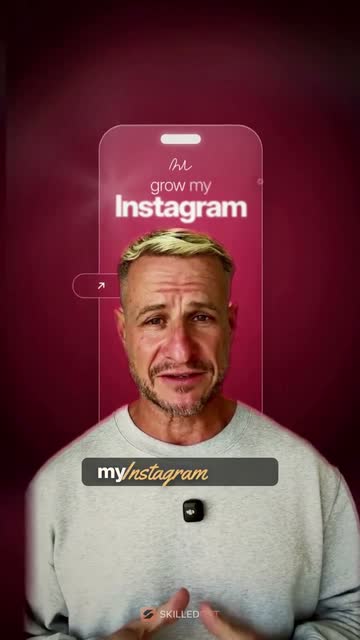 WinePuts you in a wine-red studio with a glass phone card behind your head and your words popping in as you say them./wineSee it
 ExplainerTurns a talking clip into a clear lesson with gold word-by-word captions and points on screen./explainerSee it
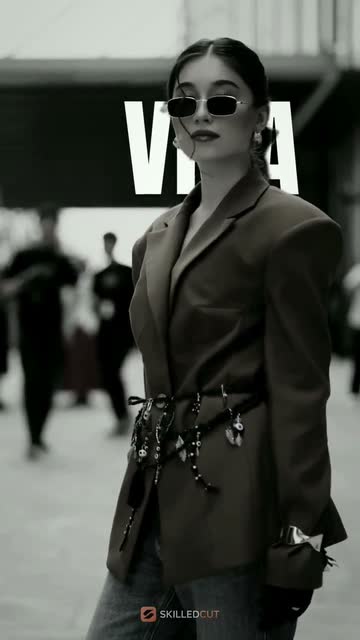 Big WordOne big keyword lands behind your head on every beat, in your own room, with tag chips flying in./big-wordSee it
Frequently asked questions
Short answers to what people ask before they try it.
Can I edit videos with no editing experience at all?
Yes. If you can describe what you want in a sentence and judge whether the result matches, an AI editor can handle the timeline work.
Do I still need to learn a video editor?
Only if you want full manual control. Many creators never open a timeline. SkilledCut can also export a rough cut for Premiere, Resolve or Final Cut if you want to finish by hand.
Which AI agent should I use?
Any MCP-capable agent works, including Claude Desktop, Claude Code, Codex, Cursor, VS Code with Copilot and Gemini CLI. Browser chat apps cannot edit files on your computer.
Is my footage uploaded?
No. SkilledCut runs on your Mac, Windows or Linux computer, and finished videos are saved to your Downloads folder.
What does it cost?
One payment of ₹999 includes every template, effect and workflow, with new templates each month and a 7-day refund.
Keep reading
For creators
How to learn video editing fast
A 30-day plan to learn and improve your video editing skills: one editor, one video type, deliberate practice and when to automate. No hype.
ReadBlog
Best free video editors for beginners
Free tools to start editing without paying: what each offers, its limits and when to move to something paid or automated.
ReadHow-to guides
Pre-post checklist for short videos
A fifteen-point checklist for short videos: hook, captions, audio, safe zones, rights, claims, file format and post copy. Use it every time.
ReadFor creators
How to brief a video editor
A short brief for editors: goal, audience, references, style rules, files, deadline and feedback process. Avoid endless revisions with clear inputs.
ReadBlog
How AI video templates work: from raw clip to finished reel
What happens between a raw clip and a styled reel: transcript, cuts, beats, cut-outs, motion graphics, rendering and the checks that catch mistakes.
Read
More in the blog or all 16 templates.
Your next Reel is one prompt away.
One payment for every template, effect, voice and workflow, plus all upcoming templates. Pay once, use forever.