

Templates in depth3 min readUpdated
How to turn a product photo into a video ad with AI
Short answer
Give your AI agent one to six product photos and ask for the Float Ad template. It cuts each product out of its background, floats and turns it in a swirl of light with a reflection, and returns a vertical ad of about six seconds for one photo. Add a name and line if you like.
On this page
What does the Float Ad template make?
Float Ad is a photo-to-video template. The product is cut out of whatever background the photo has, then floats and turns in a swirl of light streaks and particles, with a reflection under it and a camera that speeds up and eases. Each product gets its own shot, with sound effects placed on the moves. A single photo comes back as an ad of about six seconds, and more photos make a longer one.
It does not invent a product. The video is your real photo set in motion, which keeps the colours and shape true to what you sell.
Which photo works best?
The cut-out uses Apple's on-device vision tools, so it needs macOS 14 or newer on an Apple Silicon Mac.
- One product per photo, fully inside the frame, with a clear edge between the product and its background.
- A sharp, high-resolution image. Small or blurry photos cut out poorly.
- Even light with no strong shadow across the product.
- Simple shapes cut out most cleanly; glass and fine hair-like detail are harder.
What do you type to get the ad?
Drag the photo into your AI agent and ask for it by name. The command is /float-ad, or write the request in a sentence. If you want text on the final hold, give a name of up to 24 characters and a short line of up to 48.
An example prompt: "/float-ad on this product photo. Use the name Plix and the line Pomegranate youth renewal on the final hold." The prompt behind the ad on the template page is printed there so you can copy it.
What if you have several products?
Give your AI agent up to six photos in one message and each product gets a shot of its own, so a small range becomes one ad. For a larger catalogue, run the template once per product and keep the clips as separate posts. Each run reuses the same look, which makes a set of ads feel like one brand.
Where does it fall short?
It is a short, polished product hero, not a full demo. It will not show a product in use, explain features or add a voice. For those, film a short clip and use a template such as Cobalt or Amber on it, or see our guide to a product demo video.
Make it with your AI agent
Type "/float-ad on my product photo" in Claude Code, Codex or Cursor with the clip attached: product photo to video ad, handled on your computer. Copy more in the prompt library or see the Float Ad template.
Templates for this
Ask your AI agent for any of them by name. Every template is included with SkilledCut, plus all upcoming ones.
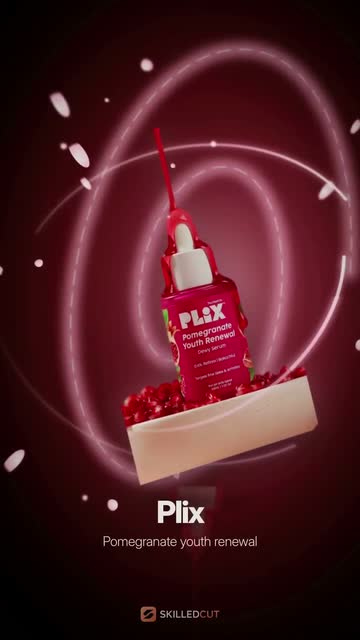 Float AdTurns a product photo into a hero ad: the product floats and turns in a swirl of light, no filming needed./float-adSee it
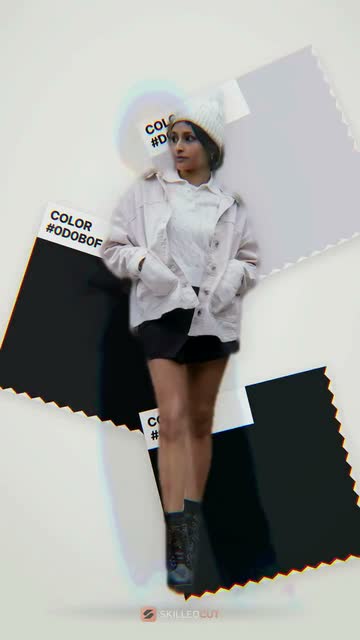 LookbookTurns outfit photos into a fashion lookbook, each look in front of fabric swatches in its own colours./lookbookSee it
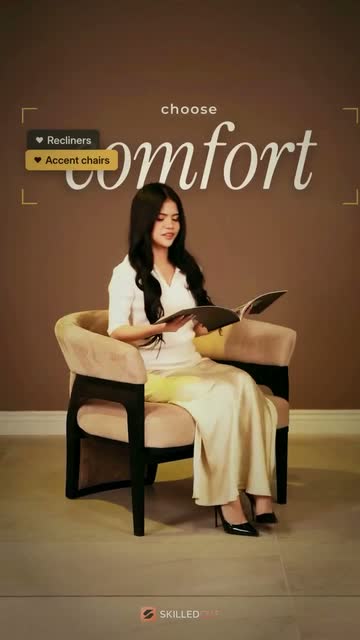 AmberYour key words land big over your head in warm serif type, with gold tag chips flying in, in your own room./amberSee it
 CobaltA bold blue keyword behind your head on every beat, with photo cards from your clip and a bright, clean grade./cobaltSee it
Frequently asked questions
Short answers to what people ask before they try it.
How long is the ad from one photo?
About six seconds. Each extra photo adds a shot, up to six products in one ad.
Do I need a clean background in the photo?
No. The product is cut out of any background, but a clear edge between product and background gives the cleanest result.
Can I add my product name?
Yes. Add a name of up to 24 characters and a line of up to 48, and they appear on the final hold. Leave them out for a clean hero shot.
Does it work on a PC or in a browser?
No. It runs on a Mac with Apple Silicon and macOS 14 or newer, and nothing is uploaded.
Is the video made from my real photo?
Yes. The product is your own photo cut out and animated, not a generated stand-in, so shape and colour stay true.
Keep reading
How-to guides
How to make a product demo video
A demo video should show the problem, the product solving it and one next step. Structure, length, screen vs face and how to keep it clear.
ReadUse cases
Video editing for e-commerce founders
E-commerce founders can use a to-camera clip for brand stories, product education and ad hooks. See which template suits each and its limits.
ReadUGC
UGC on e-commerce product pages
How to use UGC videos on e-commerce product pages: where to place them, what to ask customers, rights to secure and how to keep pages fast.
ReadBlog
InVideo alternatives for creators who film themselves
InVideo builds videos from prompts and stock. If you film yourself, these alternatives edit your footage instead.
ReadBlog
SkilledCut's {{count}} templates compared: which one for which video
Wine, Plum, Amber, Cobalt, Big Word, Notebook, Throwback, Float Ad, Lookbook and more: what each template does and which video it suits.
Read
More in the blog or all 16 templates.
Your next Reel is one prompt away.
One payment for every template, effect, voice and workflow, plus all upcoming templates. Pay once, use forever.