

Templates in depth3 min readUpdated
How to make a fashion lookbook video from outfit photos
Short answer
Give your AI agent three to twelve full-body outfit photos and ask for the Lookbook template. Each look is cut out on a white background in front of three tilted fabric swatches whose colours come from the outfit, with a flash between looks. Six photos make a clip of about ten seconds you can post as a reel.
On this page
What does the Lookbook template do?
Lookbook makes a fashion video from photos, with no filming. Each outfit is cut out and placed on a white seamless. Behind it sit three tilted fabric swatches with pinked edges and a colour label, and the swatch colours are pulled from the outfit itself, so a green jacket gets green swatches. A grey flash marks every change of look, and the clip is timed to a beat.
Six looks come out at about ten seconds, which fits a reel.
How should you shoot the photos?
- Full-body, one person, one outfit per photo, so the cut-out has the whole look.
- The same distance, angle and light across the set, so the looks feel like a series.
- A background that contrasts with the clothes, so the edge is clear.
- Three to twelve photos. Fewer than three is too short, and more than twelve makes a long reel.
What do you ask your AI agent for?
Drag the photos in and ask for the template by name, for example "/lookbook with these outfit photos". The order you give the photos is the order of the looks. Like Float Ad, it uses Apple's on-device vision tools to cut subjects out, so it needs macOS 14 or newer on an Apple Silicon Mac.
The prompt behind the example on the template page is printed there, so you can reuse the wording.
Who is a lookbook video useful for?
Boutiques showing a new drop, stylists sharing a capsule wardrobe, and creators posting an outfit series all start from the same thing: a folder of photos. A lookbook reel lets the same photos work as a video without a shoot or an editor, and the swatches add colour information that a plain slideshow does not.
What does it not do?
It does not add a voice, and it does not animate the clothes. It is a clean, designed sequence of stills. For a person talking about the outfit, film a clip and use a template such as Cobalt, which suits street and fashion footage.
Make it with your AI agent
Type "/lookbook with my outfit photos" in Claude Code, Codex or Cursor with the clip attached: fashion lookbook video, handled on your computer. Copy more in the prompt library or see the Lookbook template.
Templates for this
Ask your AI agent for any of them by name. Every template is included with SkilledCut, plus all upcoming ones.
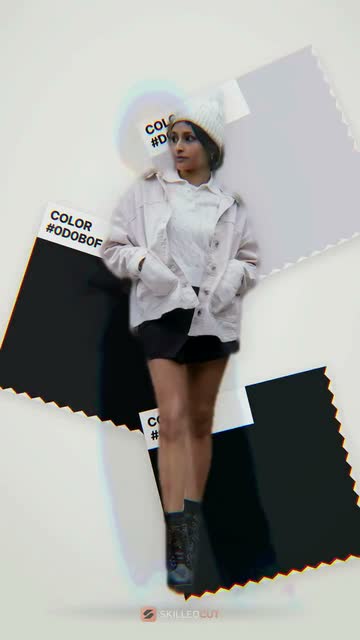 LookbookTurns outfit photos into a fashion lookbook, each look in front of fabric swatches in its own colours./lookbookSee it
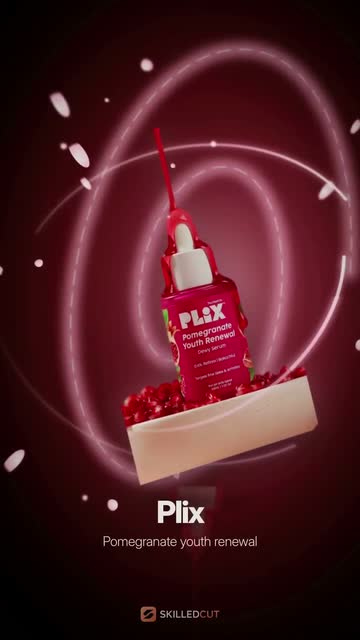 Float AdTurns a product photo into a hero ad: the product floats and turns in a swirl of light, no filming needed./float-adSee it
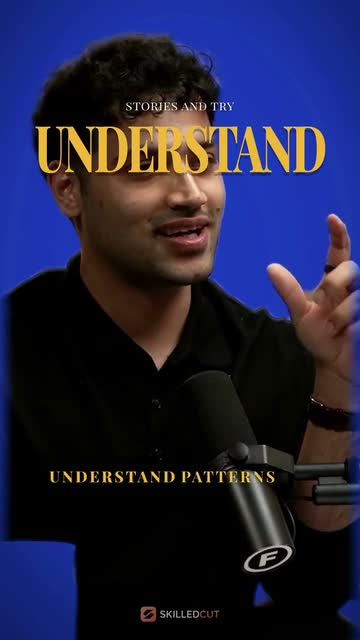
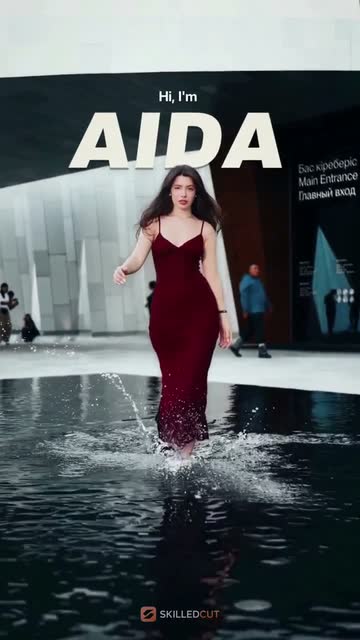 CobaltA bold blue keyword behind your head on every beat, with photo cards from your clip and a bright, clean grade./cobaltSee it
 ThrowbackYou cut out over bold retro posters that change on every line, with tall vintage headlines from your own words./throwbackSee it
Frequently asked questions
Short answers to what people ask before they try it.
How many outfit photos do I need?
Three to twelve. Each photo becomes one look, so six photos give a clip of about ten seconds.
Where do the swatch colours come from?
From the outfit in each photo. The template reads the colours of the top, the bottom and the shoes, so each look has its own palette.
Can I use photos with several people?
The template is built for one person and one outfit per photo, so use one look per image.
Does the video have music?
It is timed to a beat and finished with the same sound and loudness handling as the other templates.
Does it upload my photos?
No. The cut-out and the render happen on your computer, and the finished clip is saved to your Downloads folder.
Keep reading
How-to guides
How to make a before-and-after video
Plan a before-and-after: same framing, clear label, honest results and a short timeline. Ideas for coaches, brands and creators.
ReadBlog
How to turn a product photo into a video ad with AI
Make a floating product ad from one photo on your computer: how Float Ad works, what photo to use, what to type and what you get in about six seconds.
ReadShort-form growth
How to use on-screen text in short videos
On-screen text should add, not repeat. Learn where to place it, how large to make it, how long to hold it and when captions and titles do different jobs.
ReadBlog
SkilledCut's {{count}} templates compared: which one for which video
Wine, Plum, Amber, Cobalt, Big Word, Notebook, Throwback, Float Ad, Lookbook and more: what each template does and which video it suits.
ReadPlatform guides
Instagram Reels editing guide
How to edit for Instagram Reels: vertical 9:16, safe zones, captions, hooks and pacing, and which SkilledCut template fits. Check Instagram for limits.
Read
More in the blog or all 16 templates.
Your next Reel is one prompt away.
One payment for every template, effect, voice and workflow, plus all upcoming templates. Pay once, use forever.